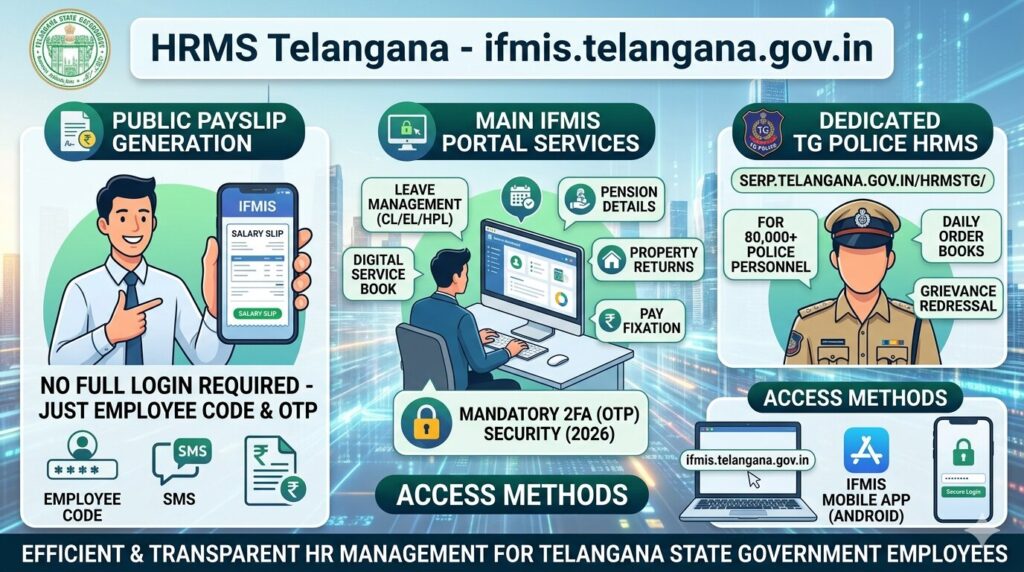

Telangana HRMS operates through the state’s IFMIS — Integrated Financial Management Information System at ifmis.telangana.gov.in. This centralized platform manages employee data, payroll, leave, service records, pay fixation, and property returns for Telangana state government employees.
What makes Telangana unique is its public payslip generation feature — employees can generate salary slips without a full system login — just by entering their Employee Code. Additionally, certain departments like Police, SERP, and Rural Development operate separate dedicated HRMS portals.
🔗 Official Portal URLs
Main IFMIS Portal: ifmis.telangana.gov.in
Public Payslip: ifmis.telangana.gov.in/get_payslip_publicview
TG Payroll: tgpayroll.cgg.gov.in
Portal Overview
Who Can Use HRMS Telangana?
- Regular Employees: All Telangana state govt employees registered in IFMIS or departmental HRMS
- Pensioners: Retired Telangana govt employees — pension details accessible through the portal
- Police Employees: TG Police HRMS covers 80,000+ personnel across DGP Office, 9 Commissionerates, 20 Districts
- SERP / RD Employees: SERP at serp.telangana.gov.in/HRMSTG/ | Rural Development has its own portal
How to Download Salary Slip — Two Methods
Method 1 — Public View (No Full Login Required)
Telangana IFMIS offers a public payslip generation page — access without full system login, just Employee Code and OTP:
- Go to ifmis.telangana.gov.in/get_payslip_publicview
- Choose search option: “Employee Code” or “Account Number”
- Enter your 7-digit Employee Code (PF Number) or bank account number
- Enter the captcha
- Click Search — your employee details are displayed
- Request OTP on your registered mobile (OTP mandatory from 2026)
- Enter the OTP
- Select Month and Year
- Generate and download your payslip in PDF format
Method 2 — Via HRMS Login
- Go to ifmis.telangana.gov.in
- Click “HRMS Login” from the navigation
- Enter your Employee Code and Password
- Complete OTP verification (mandatory from 2026)
- Go to Employee Corner → Employee Pay Slip
- Select Month and Year → Generate and download
How to Apply for Leave on Telangana HRMS
- Login to ifmis.telangana.gov.in with Employee Code and password
- Complete OTP verification
- Click “Leave Module” from the navigation bar
- Click “Apply for Leave”
- Click on the specific leave type — e.g., Casual Leave, EL, HPL
- Fill in: leave days, start date, end date, purpose, contact details
- Click Submit — goes to controlling officer for approval
- Leave balances update in real time after every approved application
All Services on HRMS Telangana
Telangana Police HRMS — Dedicated Separate Portal
The Telangana State Police operates a dedicated HRMS covering DGP Office, 9 Commissionerates, 20 Police Districts, and 12 Wings — approximately 80,000 police employees. Developed by CGG (Centre for Good Governance), Hyderabad. Won the CSI SIG eGovernance Award 2022.
TG Police HRMS Features:
- Salary pay slip download
- Online leave application (all government leave types)
- Daily Progress Report submission
- Daily Order Book generation
- Employee registration and strength details
- Inward tracking and file monitoring
- Document generation — Orders, Memos, Proceedings, UO Notes, Letters, Fax, Endorsements
- Grievance redressal, rewards, and punishments
- Increment processing and 5S implementation
- Home Guards module and out-of-state permission tracking
- Pension papers preparation for retiring police employees
- View signed copy orders from superiors
TG Police HRMS Technical Support Email: help.tspolice@cgg.gov.in
TELANGANA IFMIS Mobile App
App Name: IFMIS (Integrated Financial Management and Information System)
Platform: Android (Google Play Store)
Features: All HRMS services + instant SMS notifications for every portal activity
Setup: Download from Play Store → Install → Login with employee credentials → Link mobile number for SMS alerts
Common Problems and Solutions
Frequently Asked Questions
Q: What is the main HRMS Telangana URL?
The main IFMIS portal is ifmis.telangana.gov.in. For public payslip without full login: ifmis.telangana.gov.in/get_payslip_publicview. TG Police uses serp.telangana.gov.in/HRMSTG/.
Q: What is my Employee Code for Telangana HRMS?
Your Employee Code is a 7-digit PF Number assigned by your department. It is printed on your salary slip. Contact your DDO if you do not know it.
Q: Is OTP mandatory for Telangana HRMS?
Yes. From 2026, two-factor OTP authentication is compulsory for all HRMS Telangana logins, including the public payslip page. Ensure your correct mobile number is registered.
Q: Can I see old salary slips?
Yes. Previous salary slips are available. Select the appropriate month and year from the payslip section after login or on the public view page.
Q: What is CGG in Telangana HRMS?
CGG stands for Centre for Good Governance, Hyderabad — the technology partner for TG Police HRMS and several other Telangana e-governance applications.
Q: How is IFMIS different from HRMS in Telangana?
IFMIS (Integrated Financial Management Information System) is the overarching financial management platform. The HRMS module within IFMIS handles employee-specific HR functions like payroll, leave, service records, and appraisals.