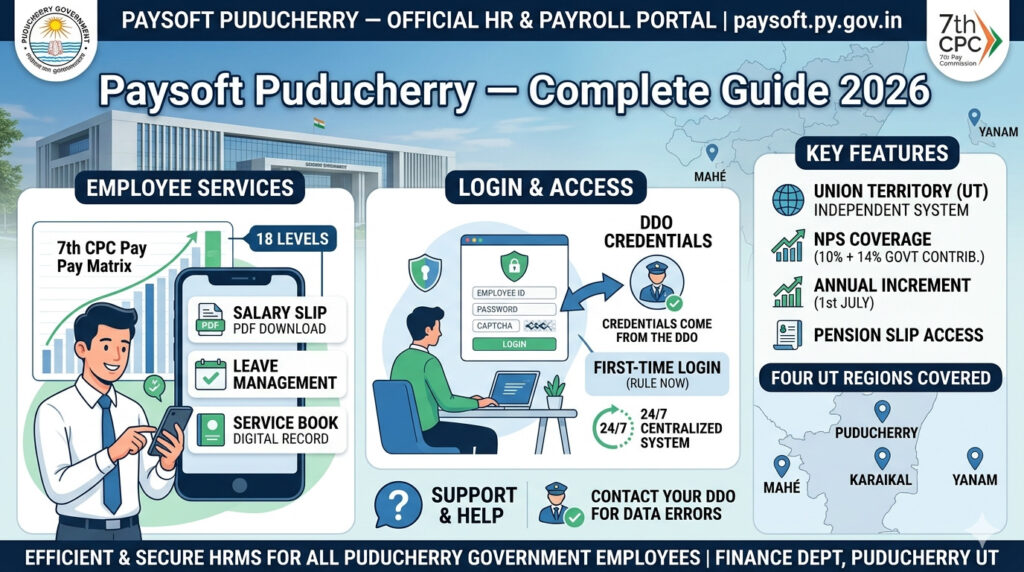

Paysoft is the official salary management and HR portal for government employees of the Union Territory of Puducherry (Pondicherry). The portal at paysoft.py.gov.in is managed by the Finance Department, Government of Puducherry and serves as the centralized system for payroll processing, salary slip access, leave management, service records, and pension services.
Puducherry being a Union Territory with Legislature has its own state-level HR and payroll system, distinct from both central government and other state systems. Paysoft covers all four regions of Puducherry UT — Puducherry, Karaikal, Mahé, and Yanam.
🔗 Official Portal URL
paysoft.py.gov.in — Official Finance Department portal for all Puducherry UT government employees.
Portal Overview
About the Four Regions of Puducherry UT
Employees posted in different regions may have varying HRA rates based on city classification. Contact your DDO for region-specific payroll allowance details.
How to Login to Paysoft Puducherry
- Open your browser and go to paysoft.py.gov.in
- On the homepage, locate the Employee Login section
- Enter your Employee ID / User ID as assigned by your department
- Enter your Password
- Complete CAPTCHA verification if displayed
- Click Login to access your employee dashboard
How to Download Salary Slip from Paysoft
- Login to paysoft.py.gov.in with your Employee ID and password
- Navigate to the Salary or Pay Slip section on your dashboard
- Select the Month and Year for which you want the salary slip
- Click View or Download
- Your salary slip opens as a PDF — download and save to your device
Puducherry Government Employee Pay Structure — 7th Pay Commission
Puducherry UT government employees follow the 7th Pay Commission (7th CPC) pay structure:
All Services on Paysoft Puducherry
Important Points for Puducherry UT Employees
- Puducherry UT employees are NOT central government employees. They are UT government employees administered by the Puducherry government. While pay follows 7th CPC, they are not under DoPT.
- Central govt employees posted in Puducherry use their ministry’s central systems (e-HRMS 2.0, central treasury) — NOT Paysoft.
- Corrections to salary data or service book errors must be done through your DDO — only DDOs have authority to correct payroll data in Paysoft.
- DA rate: Puducherry UT follows the central government DA rate — same revisions apply on 1st January and 1st July each year.
- CGHS vs UT Health Scheme: Some Puducherry UT employees may be covered under separate UT health schemes. Confirm with your department for health insurance and medical reimbursement details.
Helpdesk and Support
Frequently Asked Questions
Q: What is the official URL for Paysoft Puducherry?
The official portal is paysoft.py.gov.in — managed by the Finance Department, Government of Puducherry UT.
Q: Are Puducherry government employees under central government e-HRMS 2.0?
No. Puducherry UT government employees use the state-level Paysoft portal (paysoft.py.gov.in). Central government employees posted in Puducherry use their respective central ministry systems like e-HRMS 2.0 (e-hrms.gov.in).
Q: Do Puducherry employees follow 7th Pay Commission salaries?
Yes. Puducherry UT government employees follow the 7th Pay Commission (7th CPC) pay structure with the 18-level Pay Matrix — similar to central government employees.
Q: What NPS contribution applies to Puducherry UT employees?
Employees who joined from January 1, 2004 are covered under NPS with 10% employee contribution and 14% government contribution of Basic Pay + DA — same as the enhanced rate for central/UT government employees.
Q: How do I get my Paysoft login credentials?
Contact your department’s DDO or the Finance Department HR section. They will provide your Employee ID and initial password. Self-registration is not available.
Q: Which regions of Puducherry UT are covered by Paysoft?
All four regions — Puducherry, Karaikal, Mahé, and Yanam — are covered under the Paysoft payroll system for their respective UT government employees.