
If you are a Rajasthan government employee, you use multiple online portals for your HR and financial needs — and at the centre of all of them is the SIPF Portal and SSO (Single Sign-On) by the Government of Rajasthan.
SIPF stands for State Insurance and Provident Fund. The SIPF Department, under the Finance Department of Government of Rajasthan, manages economic security for all state government employees through General Provident Fund (GPF), State Insurance (SI), and related schemes. Salary slips for Rajasthan employees are accessed through a separate portal called PayManager.
This guide covers both portals with clear, step-by-step instructions for everything you need.
How to Login to SIPF Portal via SSO
🔑 SIPF Login via SSO
All Rajasthan government portals use the SSO (Single Sign-On) system at sso.rajasthan.gov.in. Your SIPF Portal is accessed through your SSO ID. The SIPF Portal password is your date of birth in DDMMYYYY format (without separators). Example: Born 15 March 1985 → SIPF password is 15031985.
- Go to sso.rajasthan.gov.in.
- Login with your SSO ID and password. If you do not have an SSO ID, click “Register” and use your Employee ID to create one.
- After logging into SSO, look for the SIPF tile in your dashboard.
- Click on SIPF to access the SIPF Portal.
- You are now inside the SIPF Portal — you will see Transaction and Report tabs.
- From the Transaction tab, you can apply for GPF withdrawal, SI loan, GPA proposal, etc.
- From the Report tab, you can view and download GPF statements, SI details, and other reports.
How to Download Salary Slip via PayManager
Salary slips for Rajasthan government employees are available on PayManager (paymanager.raj.nic.in) — not on the SIPF portal. PayManager is Rajasthan’s integrated payroll management system.
- Go to paymanager.raj.nic.in.
- Login with your Employee ID and password. New users may need to register first.
- After login, go to the Employee Corner or salary section.
- Select the month and year for which you want the salary slip.
- Click View or Download to save the salary slip as PDF.
All Services on SIPF Portal
1. GPF (General Provident Fund)
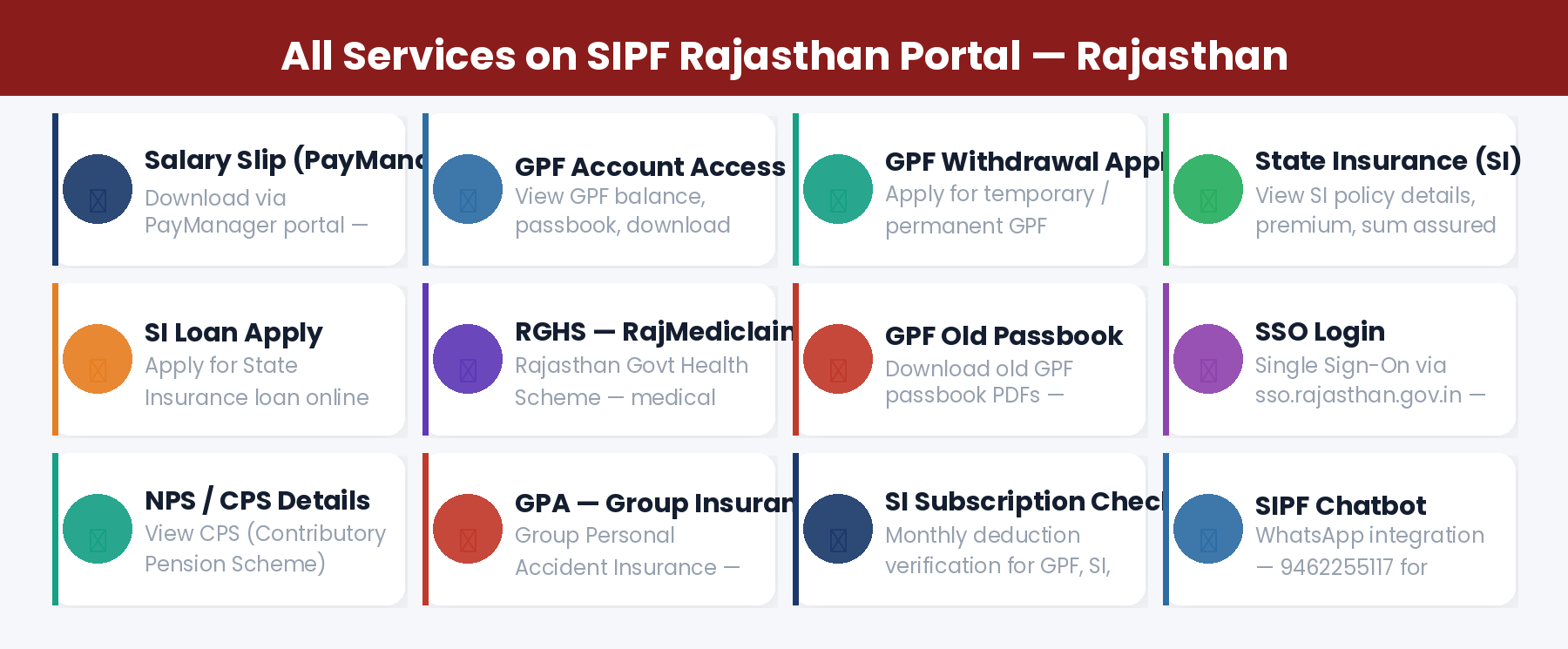
The General Provident Fund is a mandatory savings scheme for Rajasthan government employees. Every month, a fixed percentage of your salary is deducted as GPF contribution. Through the SIPF portal you can:
- View your current GPF balance in real time
- Download your GPF statement / passbook (including old pre-digitisation records)
- Apply for GPF Temporary Withdrawal (advance) online
- Apply for GPF Permanent Withdrawal (final settlement) online
- View Appendix-D / Nomination form and other GPF documents
- Report and resolve missing GPF credit issues
2. State Insurance (SI)
State Insurance is a mandatory life insurance scheme for Rajasthan government employees. On the SIPF portal you can:
- View SI Policy Number, current premium, contract details, sum assured, and bonus
- Check SI Surrender Value
- Apply for SI Loan online against your policy
- View SI Loan outstanding balance, deposit history, and interest
- Download SI passbook and policy bond PDFs
3. RGHS — Rajasthan Government Health Scheme
RGHS has replaced the old RajMediclaim scheme. Through the SIPF portal or the dedicated RGHS portal, NPS employees can submit medical reimbursement claims for indoor hospital treatment by themselves and family members.
4. GPA — Group Personal Accident Insurance
Apply for Group Personal Accident Insurance proposal and nomination online through the SIPF portal under the GPA section.
5. NPS / CPS Details
For post-2004 employees covered under NPS (National Pension System) or CPS (Contributory Pension Scheme), monthly deduction entries can be verified through the SIPF portal. You can also check your PRAN details.
SIPF Helpdesk and Support
💬 SIPF WhatsApp Chatbot
SIPF has launched a WhatsApp chatbot for quick queries. WhatsApp number: 9462255117. Send your query to get instant automated help on GPF, SI, and portal issues.
SIPF Employee ID — How to Get It
The SIPF Employee ID is a 16-character system-generated unique number issued by the SIPF Portal. It is used across all Rajasthan government financial systems.
- Your DDO (Drawing and Disbursing Officer) creates your Employee ID on the SIPF Portal
- Once created, this ID links to your salary in PayManager and your GPF account in SIPF
- If you have two different Employee IDs (one on SIPF, one on PayManager), the SIPF Portal one is correct — get PayManager corrected through your treasury office
- If your Employee ID is not on the SIPF Portal, ask your DDO to fill the online employee ID form
Frequently Asked Questions
Q: What is the SIPF Portal password?
Your SIPF Portal password is your date of birth in DDMMYYYY format. Example: Born 15 March 1985 → password is 15031985. Access SIPF via SSO at sso.rajasthan.gov.in.
Q: Where do I download my salary slip in Rajasthan?
Salary slips for Rajasthan government employees are on PayManager — paymanager.raj.nic.in. SIPF portal handles GPF, State Insurance, and related schemes.
Q: How do I apply for a GPF advance in Rajasthan?
Login to SIPF via SSO → Transaction tab → GPF Withdrawal → Select Temporary Withdrawal → Fill amount and reason → Submit. Approval takes a few working days.
Q: I forgot my SSO password. How do I reset it?
Go to sso.rajasthan.gov.in → Forgot Password → Enter SSO ID → Select recovery method (mobile OTP or Aadhaar) → Set new password.
Q: What is RGHS and who can use it?
RGHS (Rajasthan Government Health Scheme) covers Rajasthan government employees and their families for cashless treatment and medical reimbursements. NPS-covered employees can file RGHS claims through the SIPF portal.
Q: How is GPF different from NPS in Rajasthan?
GPF is the old pension scheme for employees who joined before January 1, 2004. NPS/CPS is for employees who joined on or after that date. GPF is managed by SIPF Department. NPS is managed by PFRDA/NPS Trust.