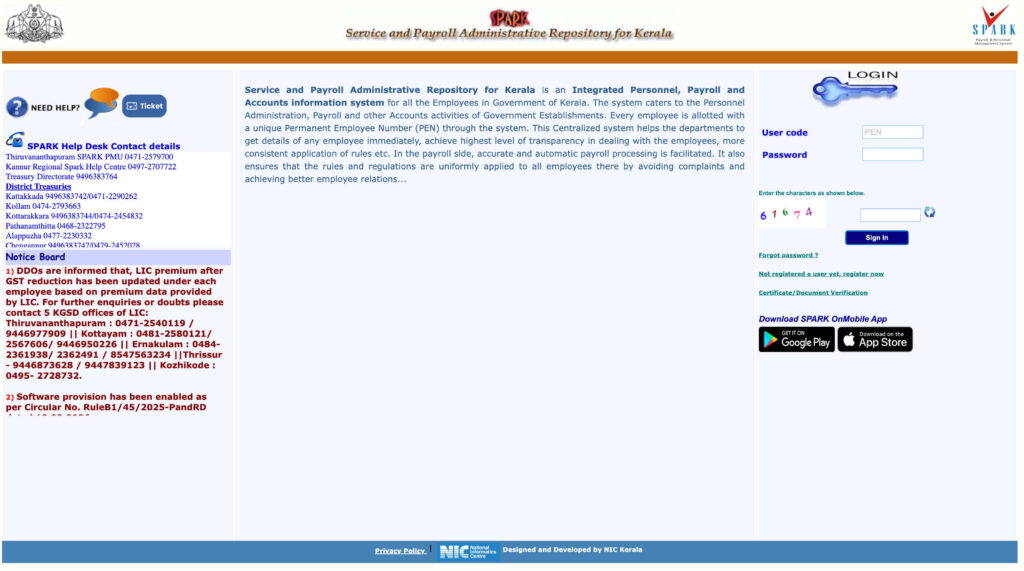

SPARK — Service and Payroll Administrative Repository for Kerala — is one of India’s most mature and comprehensive state HRMS systems. Developed by the National Informatics Centre (NIC) for the Finance Department of Kerala, SPARK serves over 5 lakh government employees across all 39 departments and thousands of offices in Kerala.
SPARK assigns every employee a unique Permanent Employee Number (PEN) — the master identifier across all government HR, payroll, and financial systems in Kerala. The system covers the entire employee lifecycle from appointment to pension settlement.
🔗 Official Portal URLs
SPARK Main Portal: spark.gov.in
G-SPARK (Aided/PSU): gspark.kerala.gov.in
KSEMP (AG Kerala): ksemp.agker.cag.gov.in
Portal Overview
What is PEN — Permanent Employee Number?
🆔 PEN — Your Most Important Number
PEN is assigned by SPARK when your Service Book is registered. It is your universal identifier across all Kerala government HR, payroll, and financial transactions. Find your PEN on your SPARK login credentials, salary slip, Service Book, or by contacting your DDO.
What is G-SPARK?
G-SPARK (Grant-in-Aid institutions & PSU Service and Payroll Administrative Repository for Kerala) is for:
- Employees of Government-aided private schools and colleges
- Employees of Public Sector Undertakings (PSUs) in Kerala
G-SPARK employees access payroll, leave, service records, and allowances at gspark.kerala.gov.in using their respective credentials.
What is KSEMP?
KSEMP (Kerala State Employees Management Portal) at ksemp.agker.cag.gov.in is operated by the Accountant General (AG) Kerala under the CAG of India. It provides:
- Pay Slip Authorization — salary bills authorized by AG
- GPF Authorization — GPF withdrawal approvals from AG
- GPF Annual Statement — download GPF annual account statement
- Reconciliation Reports — reconcile departmental accounts with AG records
- GPF Ledger — complete GPF transaction history
KSEMP handles about 3 lakh employees and also processes pension verification for aided school/college staff, local bodies, and All India Service Officers. Data reconciliation is available up to January 2026.
How to Login to SPARK Kerala
- Open your browser and go to spark.gov.in
- On the login page, enter your User ID (PEN — Permanent Employee Number)
- Enter your Password
- Enter the Captcha code
- Click “Sign In”
- Verify your name appears correctly on the dashboard after login
How to Download Salary Slip from SPARK
- Login to spark.gov.in with your PEN and password
- Click on the “Accounts” option from the top menu bar
- From the dropdown, choose “View Salary Slip”
- Click “Get Salary Slip”
- Enter the Month and Year
- Click Download — saved as PDF to your device
The SPARK salary slip contains: PEN Number, Employee Name, Designation, Department, Kerala GPF / PRAN Number, GLI (Government Life Insurance) Number, PAN, Bank Details, Pay Scale — plus Earnings (Basic Pay, DA, HRA, Allowances) and Deductions (Kerala GPF, GIS Installment, Profession Tax, GLI, Recoveries).
How to Download Pension Slip from SPARK
- Login to spark.gov.in with your pensioner credentials
- Go to “Pensioner Services” or “All Reports” tab
- Click “Pension Slip” or “Pension Statement”
- Select the Financial Year and Month
- Click the link in the “Type” column
- Download the PDF
All Services on SPARK Kerala
How to Apply for Leave on SPARK Kerala
- Login to SPARK with your personal employee credentials
- Navigate to Service Matters → Leave
- Click “Apply Leave Online”
- Select the Leave Type (EL, CL, HPL, Maternity, etc.)
- Enter From Date and To Date
- Enter the reason for leave
- Upload supporting documents if required (medical certificate for medical leave)
- Click Submit — application goes to controlling officer for approval
District Treasury Helpdesk Numbers — SPARK Kerala
Common Problems and Solutions
Frequently Asked Questions
Q: What does SPARK stand for?
SPARK stands for Service and Payroll Administrative Repository for Kerala. It is the official integrated HR, payroll, and accounts management system for over 5 lakh Kerala state government employees.
Q: What is PEN and why is it important?
PEN (Permanent Employee Number) is your unique SPARK ID assigned when your Service Book is registered. It links all your service, payroll, GPF, leave, and pension data. Your PEN is your login ID for SPARK.
Q: What is the difference between SPARK and G-SPARK?
SPARK serves regular Kerala state government employees. G-SPARK (gspark.kerala.gov.in) is for employees of Government Grant-in-Aid institutions (aided schools, colleges) and PSUs. Both developed by NIC for the Kerala Finance Department.
Q: What is KSEMP and who uses it?
KSEMP (ksemp.agker.cag.gov.in) is operated by AG (Accountant General) Kerala. It is used by DDOs and employees to view pay slip authorizations, GPF statements, annual GPF accounts, and reconciliation reports from the AG office.
Q: How do I apply for a GPF advance through SPARK?
DDO logs into SPARK → Salary Matters → Provident Fund → Apply for GPF Temporary Advance → specify amount and purpose → application goes through approving authority for sanction.
Q: Can I apply for leave without going through my DDO?
Yes. Login with your personal employee credentials → Service Matters → Leave → Apply Leave Online. Your controlling officer receives and processes the application digitally.