If you joined Indian Railways on or after 1st January 2004, you are covered under the National Pension System (NPS) — formerly known as the New Pension Scheme. Every month, a portion of your salary is deducted as your NPS contribution, and the government also contributes on your behalf. Tracking this account regularly is important for your retirement planning.
This guide explains how to view your NPS account details through Railway HRMS and the NSDL CRA portal.
Who is Covered Under NPS in Indian Railways?
💡 NPS Coverage Rule
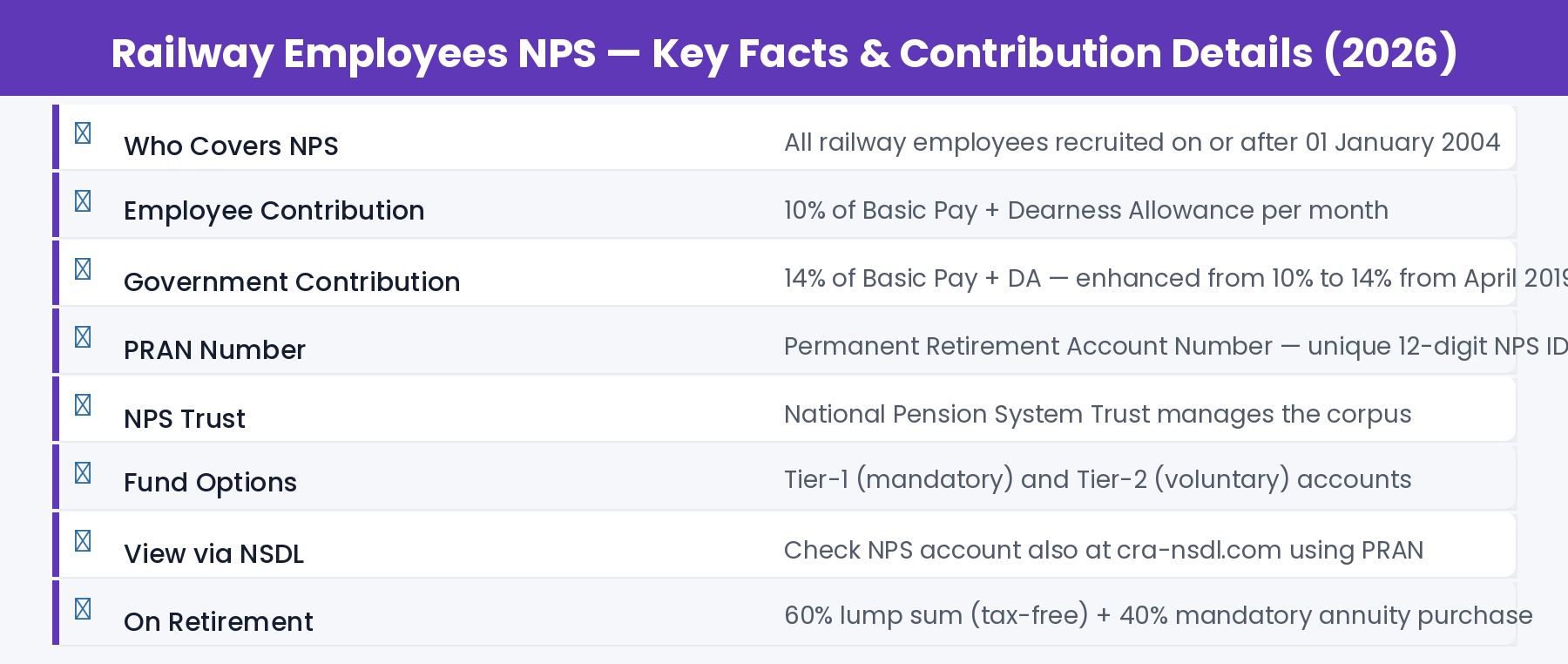
NPS applies to all Indian Railways employees who joined service on or after 1st January 2004. Employees who joined before this date are covered under the Old Pension Scheme (OPS) / General Provident Fund (GPF) system. If you joined after January 2004, you are in NPS.
⚠️ Unified Pension Scheme (UPS) — 2025 Update
In 2024-25, the government introduced the Unified Pension Scheme (UPS) as an option for NPS-covered employees. Some employees may have opted for UPS. If you opted for UPS, your contribution structure may be different. Check with your PAO or Personnel Branch for your specific scheme.
How to View NPS Account on Railway HRMS
- Go to hrms.indianrail.gov.in/HRMS and login with your HRMS ID and password.
- On your dashboard, go to ESS (Employee Self Service) from the left sidebar.
- Click on PF / NPS Details or Financial Details → NPS Information.
- Your PRAN (Permanent Retirement Account Number) and NPS account details will be displayed.
- You can see your current contribution details and recent transaction summary.
- To download a detailed NPS statement, use the NSDL CRA portal (explained below).
How to Check NPS Balance on RESS App
- Open the RESS mobile app (Railway Employee Self Service — from Google Play Store).
- Login with your Employee Number and password.
- Go to NPS Recoveries or Provident Fund section.
- You will see NPS recoveries for the current and past financial years.
- For complete account balance and corpus, use the NSDL CRA portal using your PRAN.
How to Check NPS Account on NSDL CRA Portal
For complete NPS account details including your total corpus, investment performance, and detailed statements, use the NSDL CRA (Central Recordkeeping Agency) portal:
- Go to cra-nsdl.com — the official NPS CRA portal.
- Click on “Subscriber Corner” and then “Subscriber Login.”
- Login with your PRAN number and password.
- If this is your first login, click “Forgot Password” — you will receive a reset link on your registered mobile/email.
- After login, you can see your complete NPS account — Tier-1 balance, Tier-2 balance (if applicable), fund performance, and contributions.
- Download your NPS statement from here for any period.
NPS Contribution Details for Railway Employees
✅ Tip: The government’s 14% contribution is NOT shown as a deduction on your salary slip — it is credited directly to your NPS account by the government. Your salary slip shows only the 10% employee deduction.
Understanding Your PRAN
🪪 What is PRAN?
PRAN stands for Permanent Retirement Account Number. It is a unique 12-digit number assigned to you when you joined NPS. It stays with you throughout your career, even if you transfer to a different department or state. Your PRAN is your NPS identity.
You can find your PRAN:
- On your salary slip — PRAN number is usually printed on the payslip
- On the HRMS portal under PF/NPS Details
- On the RESS app under NPS section
- From your Pay Bill Clerk at the accounts office
- By contacting NSDL helpdesk at 1800-222-080 with your employee details
NPS Account on Retirement
Income Tax Benefits on NPS Contribution
- Employee contribution (10%): Deductible under Section 80CCD(1) — within ₹1.5 lakh 80C limit
- Additional contribution up to ₹50,000 under Section 80CCD(1B) — over and above 80C limit
- Government (employer) contribution (14%): Exempt from tax up to 14% of salary under Section 80CCD(2)
Frequently Asked Questions
Q: I joined in 2004 but I cannot find my PRAN. What should I do?
Contact your Pay Bill Clerk or Personnel Branch. They can retrieve your PRAN from IPAS records. You can also call NSDL CRA helpline at 1800-222-080 with your name, date of birth, and employee number.
Q: What is Tier-1 and Tier-2 in NPS?
Tier-1 is the mandatory pension account — you cannot withdraw from it freely before retirement. Tier-2 is a voluntary savings account that you can open separately and withdraw from at any time. Railway employees are mandatorily enrolled in Tier-1 only.
Q: Can I withdraw my NPS corpus before retirement?
Premature withdrawal is allowed after 10 years of NPS membership, but only 20% can be withdrawn as lump sum — the remaining 80% must be converted into an annuity (monthly pension). Special provisions exist for medical emergencies and critical illness.
Q: What is UPS and how does it differ from NPS?
Unified Pension Scheme (UPS), introduced in 2024, provides a guaranteed pension of 50% of last basic pay after 25 years of service — similar to old pension assurance. Employees in NPS could opt for UPS during the conversion window. If you opted for UPS, you get assured pension benefits. If you stayed in NPS, you get market-linked returns. Consult your PAO for your specific situation.
Q: Is my NPS contribution showing incorrectly on HRMS?
NPS deduction shown on your salary slip is the 10% employee contribution. Government’s 14% is credited directly by the Ministry of Finance. If you see a discrepancy, raise it with your Pay Bill Clerk with your PRAN statement from NSDL.