For over 3 lakh government employees across Haryana — from teachers in Hisar to PWD engineers in Gurugram — the Intra Haryana HRMS Portal is the single digital point for all HR and financial services.
Launched under the Finance Department of the Government of Haryana, Intra Haryana integrates salary data from the e-Salary Haryana system, GPF data from AG Haryana, leave management, service books, and annual property returns into one unified portal at intrahry.gov.in.
How to Register on Intra Haryana (First Time)
- Go to intrahry.gov.in.
- Click on “New Registration” near the login area.
- Select your Employee Type and enter your Payee Code or Salary Bank Account Number.
- The system displays the mobile number registered with HRMS/e-Salary. Verify it is correct.
- If mobile is wrong, contact your DDO (Drawing and Disbursing Officer) to update it in the system first.
- Request and enter the OTP sent to your verified mobile number.
- Create a strong password and confirm it.
- Registration complete — you can now login.
How to Login — Two Methods Available
🔐 Method 1 — OTP Login (Recommended)
Go to intrahry.gov.in → Select “OTP Login” → Enter your registered mobile number → Get OTP → Enter OTP + CAPTCHA → Submit → Dashboard opens.
🔑 Method 2 — Password Login
Go to intrahry.gov.in → Select “Password Login” → Enter Employee ID → Enter Password → Enter CAPTCHA → Submit → Dashboard opens. Faster if you remember your password.
How to Download Salary Slip on Intra Haryana
- Login to your account at intrahry.gov.in.
- On the dashboard, look for “e-Salary Slip” or “e-Salary Services” — usually under Employee Services.
- Click on it to open the payslip module.
- From the dropdown, select the Month and Year for which you want the salary slip.
- Click “View” or “Generate Report”.
- Your salary slip PDF opens. Download and save it.
The Intra Haryana salary slip is a digitally valid official document accepted for bank loans, home loans, visa applications, and income tax purposes.
All Services Available on Intra Haryana
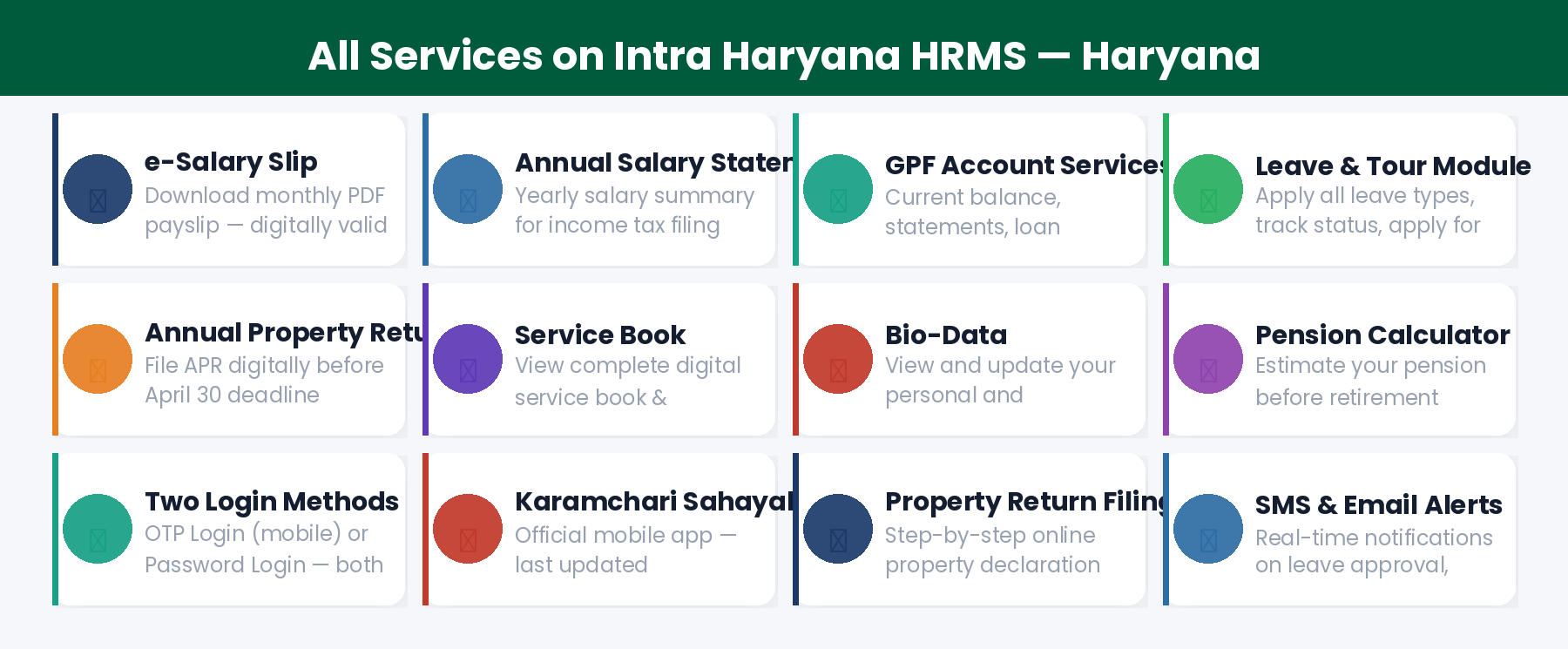
1. e-Salary Slip & Annual Salary Statement
Download monthly payslip for any past month. Also download your Annual Salary Statement for the full financial year — useful for home loans, income tax calculations, and year-end financial planning.
2. GPF Account Services
View your complete General Provident Fund account maintained by the Accountant General (AG) Haryana:
- Current GPF balance and transaction history
- GPF Statement download (current year and previous years)
- Loan Recovery Statement — how much of your GPF loan has been recovered
- Missing GPF Credit — identify and report any uncredited contributions
- Missing GPF Schedule — track GPF deduction schedules
3. Leave & Tour Module
Apply for all types of leave — Casual Leave, Earned Leave, Medical Leave, Half Day Leave. Track approval status in real time. Your controlling officer receives instant notification. You can also apply for official tour approval and TA/DA claims through the same module.
4. Annual Property Return
All Haryana state government employees — Group A, B, and C — must file their Annual Property Return (APR) digitally. Deadline: April 30th every year. Login → Property Return → Select Year → Fill immovable and movable property details → Submit. Download acknowledgement for your records.
5. Service Book
View your complete digital service book including all postings, promotions, increments, training records, and employment history. Verify your service book entries regularly — errors can affect pension calculations.
6. Pension Calculator
As you approach retirement, use the built-in Pension Calculator on Intra Haryana to estimate your monthly pension based on your service period and last drawn pay.
7. Bio-Data
View and update your personal and employment bio-data — contact details, family information, and other profile data.
Intra Haryana Helpdesk
Frequently Asked Questions
Q: What is the official URL of Intra Haryana HRMS?
The official URL is https://intrahry.gov.in. Always type it directly in your browser. Never use a different URL or search result link.
Q: How do I find my Payee Code for Intra Haryana registration?
Your Payee Code is issued by your department or DDO. You can also find it on your salary slip. Contact your HR section or DDO if you do not know it.
Q: My GPF balance on Intra Haryana looks wrong. What to do?
GPF data is maintained by AG Haryana. Contact the AG Haryana office or your departmental accounts section to report and resolve GPF discrepancies.
Q: What is the property return deadline for Haryana employees?
April 30th every year. All Group A, B, and C employees must file APR. The Chief Secretary has taken a serious view on non-compliance.
Q: Can I access Intra Haryana on a mobile phone?
Yes. intrahry.gov.in works on mobile browsers. There is also the Karamchari Sahayak mobile app — download from Google Play Store.