Karnataka has built one of India’s most comprehensive state HRMS ecosystems. The HRMS portal at hrms.karnataka.gov.in serves over 6 lakh government employees and is managed by the Centre for e-Governance (CeG) under the Finance Department, Government of Karnataka.
What makes Karnataka unique is that it has three distinct login categories — Government employees, Aided institution employees, and Boards/Universities employees. Each uses the KGID (Karnataka Government Insurance Department) number as the primary identifier. In 2025-2026, an additional Employee Self Service portal was launched at hrmsess.karnataka.gov.in, giving employees direct OTP-based access.
🔗 Official Portal URLs
Main HRMS Portal: hrms.karnataka.gov.in
ESS Self Service Portal: hrmsess.karnataka.gov.in
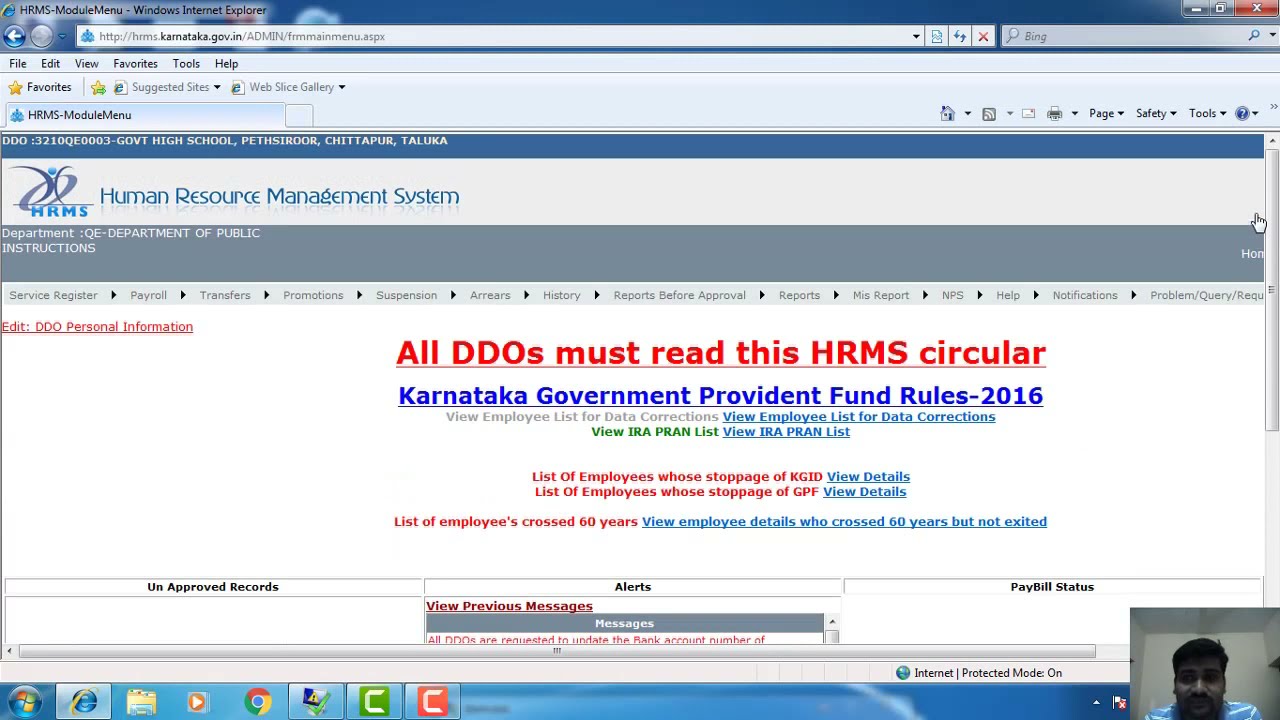
HRMS Karnataka Portal Overview
Who Can Use HRMS Karnataka?
- HRMS-Govt: All Karnataka state government employees in regular departments — education, health, revenue, police, PWD, forest, agriculture, etc.
- HRMS-Aided: Employees of aided private schools, colleges, and institutions receiving government aid whose salaries are processed through the government system.
- HRMS Boards/Universities: Employees of state-owned boards, corporations, and universities connected to the HRMS system.
How to Login to HRMS Karnataka
Method 1 — Main HRMS Portal (hrms.karnataka.gov.in)
- Go to hrms.karnataka.gov.in
- On the homepage, choose your login type: HRMS-Govt, HRMS-Aided, or HRMS Boards/Universities
- Enter your User ID (Employee Code / KGID Number)
- Enter your Secret Password
- Enter the Captcha code
- Select language as English
- Click Login to access your HRMS dashboard
Method 2 — ESS Self Service Portal (hrmsess.karnataka.gov.in)
The HRMS ESS portal gives employees direct access without going through their DDO. Launched in 2025-2026, it uses OTP-based login for added security.
- Go to hrmsess.karnataka.gov.in
- Enter your KGID Number
- Click “Send OTP” — a 6-digit OTP is sent to your registered mobile
- Enter the OTP
- You are now logged into the ESS dashboard
How to Get Login Credentials (Registration)
Self-registration is NOT available on HRMS Karnataka. Your DDO (Drawing and Disbursing Officer) registers you:
- Provide your mobile number to your DDO
- DDO enters your details and generates your login ID in the HRMS system
- Your login ID is your Employee Code / KGID Number
- Initial password is sent to your registered mobile
- Login immediately and change your password
How to Download Salary Slip
Via Main Portal:
- Login to hrms.karnataka.gov.in
- Click on “Reports” from the menu
- Select Timeline, Month, and Year
- Click Submit
- Click the Download tab to save as PDF
Via ESS Portal:
- Login to hrmsess.karnataka.gov.in with KGID + OTP
- Go to the “E-Salary” section
- Select month and year
- Click View or Download — salary slip opens as PDF
The Karnataka salary slip contains: Employee Name, Employee Code, Designation, GPF/PRAN Number, GLI Number (Group Life Insurance), PAN Number, Bank Details, Pay Scale, Earnings (Basic Pay, DA, HRA, Allowances) and Deductions (GPF, GIS Installment, Profession Tax, GLI, Recoveries).
How to Change Password
- Go to hrms.karnataka.gov.in
- At the bottom of the login page, click “Change Password” (also shown in Kannada: ಪ್ರವೇಶಪದ ಬದಲಾಯಿಸು)
- On the Password Management page: select your Role, enter DDO Code, enter Old Password, enter New Password (different from old), enter Confirm Password
- Click Save — password changed successfully
All Services on HRMS Karnataka
Common Problems and Solutions
Helpdesk
Q: What is the official URL for HRMS Karnataka?
Main HRMS portal: hrms.karnataka.gov.in. Employee Self Service portal: hrmsess.karnataka.gov.in. Both are official Government of Karnataka portals managed by the Centre for e-Governance.
Q:What is KGID number and how do I find it?
KGID stands for Karnataka Government Insurance Department. Every Karnataka government employee has a KGID number — it is your primary identifier in HRMS and links to your group insurance policy. Find it on your salary slip or by contacting your DDO.
Q: C an Karnataka teachers download salary slips from HRMS?
Yes. Government school teachers use HRMS-Govt login. Aided school teachers use HRMS-Aided login. Both can download salary slips from hrms.karnataka.gov.in or hrmsess.karnataka.gov.in.
Q: What is HRMS ESS Karnataka (hrmsess.karnataka.gov.in)?
HRMS ESS is the newer Employee Self Service portal launched in 2025-2026. It allows employees to access salary slips, leave balances, service book, and transfer documents directly — without their DDO. Login uses KGID + OTP.
Q: Is OTP mandatory for Karnataka HRMS login?
OTP is mandatory on the ESS portal (hrmsess.karnataka.gov.in). The main portal (hrms.karnataka.gov.in) uses User ID and Secret Password without OTP.
Q: How many employees are covered under HRMS Karnataka?
Over 6 lakh employee salary accounts across government, aided institutions, boards, and universities. Over 21,000 DDOs manage monthly salary processingv