Managing over 24,000 employees spread across hundreds of delivery hubs, warehouses, fulfilment centres, and offices across India is no small operational challenge. To bring order, transparency, and efficiency to its massive workforce, Delhivery — one of India’s largest logistics companies — runs a dedicated HR platform called HRMS Delhivery. This guide covers everything employees need to know about the portal in 2026.
What is HRMS Delhivery?
HRMS Delhivery is the official internal Human Resource Management System built specifically for the employees of Delhivery Limited. It is the company’s centralized digital platform where all HR functions — attendance, payroll, leave management, performance tracking, and employee self-service — come together in one secure portal.
Before this system existed, Delhivery employees had to rely on physical registers, manual payroll processing, paper-based leave forms, and direct calls to HR for every routine need. At the scale Delhivery operates — covering lakhs of shipments across thousands of pin codes with employees from warehouse staff and delivery executives to software engineers and logistics managers — manual HR processes are simply not viable.
HRMS Delhivery solves this by giving every employee, regardless of their role or location, secure 24/7 digital access to their employment records, payslips, attendance history, and leave status — from a laptop or mobile phone.
About Delhivery — The Company Behind the Portal
Understanding the scale of Delhivery helps appreciate why a robust HRMS is non-negotiable for the organization. Delhivery is not just another courier company — it is India’s largest integrated third-party logistics (3PL) service provider, operating an extraordinarily complex supply chain across the entire country.
Key Facts About Delhivery:
| Feature | Details |
| Founded | May 2011 (as SSN Logistics Ltd) |
| Founders | Sahil Barua, Mohit Tandon, Bhavesh Manglani, Suraj Saharan, Kapil Bharati |
| Headquarters | Gurugram, Haryana, India |
| CEO | Sahil Barua |
| Listed on | BSE (543529) and NSE |
| FY25 Revenue | ₹9,372 crore |
| FY25 Net Profit | ₹162 crore (first annual profit in company history) |
| Employees | 24,000+ across India |
| Total Funding Raised | $1.25 billion |
| Key Investors | SoftBank, Fidelity Investments, Nexus Venture Partners |
| Services | Express parcel delivery, PTL/TL freight, warehousing, fulfilment, cross-border logistics, supply chain solutions |
| Acquisitions | Spoton Logistics (2021), Transition Robotics Inc — California-based drone company (2021) |
Delhivery started in 2011 delivering flowers and food for offline stores in Gurgaon. By August 2011, it had pivoted to e-commerce logistics. Today it serves as the logistics backbone for thousands of businesses — from D2C brands and SMEs to large e-commerce platforms like Amazon, Flipkart, and Myntra. Managing 24,000+ employees working in shifts across this geographically distributed operation requires exactly the kind of centralized HR technology that HRMS Delhivery provides.
HRMS Delhivery — Quick Reference
The following table gives you all the essential portal details at a glance, so you always know where to go and how to access the system.
| Feature | Details |
| Official Portal URL | hrms.delhivery.com |
| Alternate Portal | newton.delhivery.com (HRMS Portal option) |
| Who Can Access | Registered Delhivery employees only — internal system |
| Login Methods | Two options: Employee ID + Password OR OTP on registered mobile |
| Password Recovery | Forgot Password → Registered email or mobile → Reset link |
| Mobile Access | Mobile-responsive portal + internal mobile app (distributed by HR/IT) |
| Session Security | Role-based access control + internal security protocols |
| Self-Registration | Not available — accounts created by HR/IT during onboarding |
| Portal Language | English |
| Availability | 24/7 from any internet-enabled device |
How to Login to HRMS Delhivery — Step by Step
Accessing the HRMS Delhivery portal is quick and straightforward, with two different login methods available to suit employees in different situations — those who remember their password and those who prefer the faster OTP route.
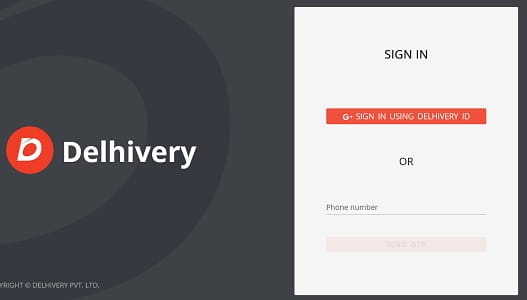
Step 1 — Open the Official Portal Open Google Chrome or any modern browser and navigate to hrms.delhivery.com. Alternatively, you can visit newton.delhivery.com and select the HRMS Portal option from the choices on the landing page. Always type the URL directly to ensure you are on the genuine company portal.
Step 2 — Choose Your Login Method The portal offers two ways to log in. Choose whichever is more convenient for you at that moment.
Login Method 1 — Delhivery Employee ID + Password:
- Enter your Employee ID (provided at the time of joining Delhivery)
- Enter your Password
- Click Login
Login Method 2 — OTP (One Time Password):
- Enter your registered mobile number
- An OTP is sent to your registered phone
- Enter the OTP in the designated field
- Click Submit / Login
Step 3 — Navigate the Dashboard After successful login, the HRMS Delhivery homepage opens. The dashboard gives you access to all available modules — attendance records, leave applications, salary slips, training reports, performance updates, and HR notifications. The layout is designed to be intuitive so that even employees with limited tech experience can find what they need quickly.
Step 4 — Complete Your Task Navigate to the specific section you need — payroll for salary slips, leave module for applications, attendance for records — and complete your task.
Step 5 — Log Out Safely After finishing, always click the Logout or Sign Out option. This is especially important if you are using a shared device at a delivery hub, warehouse, or office workstation where other colleagues also use the same computer.
How to Reset Your HRMS Delhivery Password
Forgetting your password is a common issue easily resolved in minutes, without needing to contact HR for every login problem.
- Go to the HRMS Delhivery login page at hrms.delhivery.com
- Click on the “Forgot Password?” link below the login fields
- Enter your registered email address or Employee ID in the field
- Check your registered email inbox for a password reset link
- Click the link in the email and follow the on-screen instructions
- Create a new strong password — combine uppercase letters, lowercase letters, numbers, and at least one special character
- Login with the new password immediately to confirm it works
If the reset email does not arrive within 5 minutes, check your spam or junk folder. If the issue persists, reach out to your HR team or the internal IT helpdesk — they can manually trigger the password reset on the backend.
How to Download Salary Slip from HRMS Delhivery
Your salary slip is one of the most important documents you access regularly — needed for bank loans, tax filings, rental agreements, and personal financial records. Here is the exact process to download it from HRMS Delhivery.
Step 1 — Login Access hrms.delhivery.com and login using your Employee ID + Password or OTP method.
Step 2 — Go to Salary Management On the dashboard homepage, navigate your cursor to the “Salary Management” or “Payroll” section and click on it.
Step 3 — Select Salary Slip On the next page, you will see payroll-related options. Click on “Salary Slip” from the available options.
Step 4 — Choose Month and Year Select the specific month and year for which you want the salary slip using the date picker or dropdown.
Step 5 — Generate and Download Click “Generate” or “View” to load your salary slip. Once it appears on screen, click “Download” to save it as a PDF file to your device.
Note: The portal may occasionally ask for OTP verification via your registered mobile number before generating the salary slip, as an additional security measure. Keep your phone accessible when downloading payslips.
Download and save your salary slips every month without fail. Banks, housing finance companies, and NBFCs typically require the last 3 to 6 months of salary slips for loan approvals. Having them saved locally means you are never scrambling to access them at a critical moment.
What Your Delhivery Salary Slip Contains
The salary slip generated through HRMS Delhivery is a detailed financial document that provides complete transparency into your monthly earnings and deductions.
| Section | Details Included |
| Employee Details | Name, Employee ID, Designation, Department, Location |
| Pay Period | Month and year of the salary |
| Basic Pay | Fixed salary component — the foundation of all calculations |
| Dearness Allowance (DA) | Cost-of-living component (if applicable based on employment terms) |
| House Rent Allowance (HRA) | Based on posting city and designation level |
| Special Allowance | Additional fixed allowances as per employment contract |
| Conveyance Allowance | Travel-related allowance for eligible employees |
| Performance Bonus | Variable pay component based on monthly or quarterly performance |
| Overtime Pay | Calculated automatically for hours worked beyond shift limits |
| Gross Earnings | Total of all earning components before deductions |
| Provident Fund (PF) | Mandatory monthly PF contribution deducted from gross |
| ESI | Employee State Insurance deduction (for eligible salary brackets) |
| Professional Tax | State-specific deduction where applicable |
| Income Tax (TDS) | Tax deducted at source based on annual income and declarations |
| Other Deductions | Loan repayments, advances, insurance premiums |
| Net Pay | Final amount credited to your bank account |
HRMS Delhivery Attendance System
Accurate attendance tracking is fundamental for a logistics company like Delhivery, where employees work across shifts, delivery routes, warehouses, and office locations — often around the clock.
The HRMS Delhivery attendance system automates what was once a completely manual process, recording exact clock-in and clock-out times for every employee every day through multiple methods:
How Attendance is Recorded:
- Delivery executives and warehouse staff use biometric devices at their assigned hubs and sorting centres
- Field employees may use the mobile application distributed by the HR or IT department, with GPS-based location verification
- Office-based employees use the portal-based attendance system
- All attendance data feeds automatically into the central HRMS, visible to both the employee and their supervisor in real time
What Employees Can View on the Attendance Portal:
- Daily check-in and check-out times for the current and past months
- Total working hours per day and per month
- Shift schedule — assigned shifts, shift changes, and rest day records
- Overtime hours worked
- Any pending attendance regularisation requests and their approval status
Attendance Regularisation: If your attendance was not recorded correctly — due to a biometric device failure, a network issue, or official work outside your designated location — you can submit an Attendance Regularisation Request through the portal. Your supervisor reviews the request and approves or rejects it, which then updates the official attendance record.
Why This Matters: For a logistics company running multiple shifts 365 days a year, attendance directly impacts payroll accuracy. Every hour matters — overtime pay, leave encashment calculations, and performance records all depend on attendance data being correct. The automated system removes the risk of manual entry errors and makes disputes much easier to resolve with a digital, timestamped record.
Leave Management on HRMS Delhivery
The leave module eliminates the need for paper leave applications, WhatsApp messages to managers, and follow-up calls to HR — the entire leave process runs digitally through the portal.
How to Apply for Leave:
- Login to hrms.delhivery.com
- Navigate to the Leave Management or Leave Application section
- Click “Apply for Leave”
- Select the Leave Type from the dropdown
- Enter the From Date and To Date
- Type the Reason for Leave in the text box
- Click Submit — your application is instantly forwarded to your reporting manager
- Your manager approves or rejects it through their portal — you receive a notification
- Your leave balance updates automatically after approval
Key Leave-Related Features:
- View current leave balance for every leave type before applying
- Track real-time approval status — pending, approved, or rejected
- Withdraw a pending leave application before it is processed
- View complete leave history for the current and past years
- Check the organizational calendar for company holidays, declared shutdowns, and festive offs
Leave Types Available for Delhivery Employees:
| Leave Type | Description |
| Casual Leave | Short-duration personal leave for urgent needs |
| Sick Leave / Medical Leave | Leave due to illness, with or without medical certificate |
| Earned Leave / Privilege Leave | Accrued over service period — can be accumulated |
| Maternity Leave | For female employees during pregnancy and post-childbirth |
| Paternity Leave | For male employees at the time of child’s birth |
| Compensatory Off | Earned for working on weekly off days or public holidays |
| Emergency Leave | Granted for sudden personal emergencies |
| Leave Without Pay | When no paid leave balance remains |
All Features Available on HRMS Delhivery
The following is a complete picture of every module and service available on the HRMS Delhivery portal, organized by what employees actually use it for on a daily, monthly, and annual basis.
Employee Self-Service (ESS): This is the core of what makes HRMS Delhivery valuable for individual employees. Through the ESS feature, every Delhivery employee independently manages their own HR tasks without depending on HR personnel for routine needs. Employees can view and update personal details like contact numbers, residential address, and emergency contacts. They can access all payslips, attendance records, and leave status in one place. The self-service model reduces HR workload significantly while giving employees immediate answers to their most common questions.
Payroll and Salary Management: The payroll module handles all aspects of salary computation and disbursement digitally. Salaries are calculated automatically by incorporating basic pay, all applicable allowances, overtime, performance bonuses, and deductions — eliminating manual calculation errors. Employees can access and download monthly salary slips at any time. The system also provides complete salary breakdown transparency — every rupee earned and every deduction is visible and explained. Historical payslips going back multiple months are available for download whenever needed.
Attendance and Time Tracking: Delhivery’s geographically distributed operations make automated attendance tracking essential. The portal records daily check-in and check-out times, tracks total working hours and overtime, manages shift schedules, and flags attendance discrepancies for review. Biometric integration at hubs and sorting centres ensures that attendance data for warehouse and delivery staff is captured without any manual register maintenance.
Performance Management and Appraisals: The performance module allows managers to move beyond informal assessments and conduct structured, data-driven evaluations. Supervisors set quantifiable performance targets for their teams at the start of each assessment cycle. Progress is tracked throughout the year — not just evaluated once at year end. Managers can provide ongoing feedback through the portal, and employees can view their ratings, improvement areas, and training recommendations. For a company where performance directly impacts business outcomes — delivery accuracy, on-time rates, customer satisfaction — this structured approach ensures employees are consistently aligned with operational goals.
Training and Development: Delhivery invests significantly in upskilling its workforce — from delivery executives learning safe handling procedures to warehouse staff trained on scanning systems and managers trained on logistics software. The training module on HRMS Delhivery allows employees to view scheduled training programs, register for sessions relevant to their role, track completion status, and access training history. Mandatory training notifications are sent automatically to eligible employees, ensuring no one misses critical compliance or skill-development requirements.
Recruitment and Onboarding: For a company that regularly hires delivery executives, warehouse staff, and corporate employees at scale, a digital recruitment pipeline is non-negotiable. The HRMS recruitment module allows HR teams to post job openings, manage applications, schedule assessments and interviews, and process digital onboarding paperwork for new joiners. When a new employee is brought on board, their HRMS account is created by HR, their service record is populated, and they receive their login credentials — allowing them to start using the portal from their very first working day.
Grievance and Communication Management: Delhivery employees can raise HR-related complaints, queries, and requests directly through the portal. This creates a structured, traceable record of every grievance — ensuring that nothing gets lost in WhatsApp messages or verbal conversations. The portal also serves as a communication channel for company-wide announcements, policy updates, shift changes, and other official notifications — ensuring every employee is informed, regardless of their location or shift.
Benefits Administration: Employees can view their benefits enrollment — provident fund details, ESI coverage, group insurance policy information, and other company-provided benefits. Nominee details for PF and insurance can be reviewed through the portal, ensuring that all critical financial records are up to date.
HRMS Delhivery Mobile Access
For delivery executives, field agents, and employees working away from office workstations, mobile access to HRMS Delhivery is not just convenient — it is essential. Delhivery addresses this through two channels.
Mobile Browser Access: The hrms.delhivery.com portal is optimized for mobile browsers. Employees can access all major features — attendance, payslips, leave applications — from any smartphone browser without needing to install anything.
Internal Mobile Application: Delhivery also distributes an internal mobile app through the HR or IT department. This app is not publicly available on the Play Store or App Store — it is provided directly to employees and installed through official company channels. The app allows attendance management, payslip access, leave applications, shift scheduling, and notifications — all from a mobile-native interface designed for ease of use on the go.
If you do not have the internal mobile app, contact your HR or IT team to request access. The app is particularly useful for delivery executives and warehouse staff who are rarely at a fixed computer workstation.
Why HRMS Delhivery Matters for a Logistics Workforce
Delhivery’s business model creates specific workforce management challenges that a generic HR system simply cannot address effectively. Here is why HRMS Delhivery is specifically tailored for the logistics context:
Geographically Dispersed Workforce: With 24,000+ employees spread across delivery hubs, sorting centres, warehouses, and offices in cities and towns across India, there is no way to centralize HR operations through a physical HR office. HRMS Delhivery gives every employee the same HR access regardless of whether they are in Mumbai, Patna, Coimbatore, or a Tier-3 town hub.
Shift-Based Operations: Logistics never stops — shipments are sorted and dispatched around the clock. HRMS Delhivery tracks attendance and shift schedules accurately for employees working morning shifts, evening shifts, night shifts, and 24-hour operations, ensuring payroll is calculated correctly for different shift structures.
Regulatory Compliance at Scale: With employees across multiple Indian states, Delhivery must comply with state-specific labour laws — Shops and Establishments Acts, Professional Tax rates, ESI applicability thresholds, PF regulations, and more. The HRMS automates compliance by applying the correct rules based on each employee’s location and salary, reducing the risk of regulatory penalties.
High-Volume Hiring and Turnover: Logistics companies — especially those handling e-commerce volumes that spike during festive seasons — regularly hire, manage, and exit large numbers of employees. The HRMS makes onboarding faster, exit formalities smoother, and full-and-final settlement calculations accurate.
Data-Driven Decision Making: For managers overseeing large field teams, having real-time data on attendance, overtime, and leave utilization is essential for planning daily operations. HRMS Delhivery surfaces this data instantly, allowing supervisors to make informed decisions about manpower allocation, backup coverage, and shift planning.
HRMS Delhivery vs Manual HR Processes
The following comparison shows what life looked like for Delhivery employees before the HRMS and how things have changed since its implementation.
| HR Activity | Before HRMS | With HRMS Delhivery |
| Getting a salary slip | Email HR → wait 1-2 days | Login and download in under 60 seconds |
| Applying for leave | Paper form or WhatsApp message | Apply online — manager notified instantly |
| Checking leave balance | Ask HR or manager verbally | Always visible on dashboard |
| Attendance for field staff | Manual register at hub | Biometric/GPS — automatic and accurate |
| Salary errors and disputes | Manual investigation — days to resolve | Digital records — instant verification |
| Performance reviews | Annual, informal, inconsistent | Structured, data-driven, continuous |
| Training notifications | Verbal or WhatsApp group messages | Automated system alerts to relevant employees |
| Grievance filing | Walk-in to HR office | Digital submission with tracking |
| Payroll calculation | Manual — prone to errors | Fully automated — accurate every time |
| Onboarding a new employee | Physical forms, manual account setup | Digital paperwork + instant system access |
Security on HRMS Delhivery
The HRMS Delhivery portal handles sensitive personal and financial data for thousands of employees. The security architecture of the portal reflects this responsibility.
Data Protection Measures:
- All data transmitted between the user’s device and the server is encrypted using standard web security protocols
- Role-based access control ensures employees only see their own data — a delivery executive cannot access a manager’s salary slip or another employee’s attendance record
- The two-factor login option (Employee ID + Password, or OTP verification) adds an extra layer of identity verification
- Internal security policies govern who within Delhivery’s IT and HR departments can access employee data at the backend
Best Security Practices for Employees:
- Never share your Employee ID or password with anyone — not with colleagues, not with people claiming to be from HR or IT
- Always log out after using the portal — especially on shared workstations at delivery hubs
- Do not use public Wi-Fi networks to access the portal without additional security measures
- If you notice any unusual activity on your account — unexpected changes, unfamiliar login history — report it to the IT helpdesk immediately
- Choose a strong, unique password that is not the same as your personal email or social media passwords
Common Problems and Solutions
The following table covers the most frequently reported login, payroll, and attendance issues along with their solutions, so most employees can resolve common problems without waiting for HR support.
| Problem | Likely Cause | Solution |
| Cannot login with Employee ID | Wrong ID format or outdated credentials | Confirm Employee ID from your joining letter; try OTP login as alternative |
| Password is not accepted | Wrong password or expired credentials | Use Forgot Password → check email for reset link |
| OTP not received on mobile | Wrong mobile number registered or network issue | Check if you are in coverage; wait 2 minutes and retry; contact HR to verify registered number |
| Salary slip not available for the current month | Payroll cycle not yet completed | Wait until the designated payroll processing date; payslips are typically available 2-5 days after the month ends |
| Attendance shows as absent but I was present | Biometric failure or data sync delay | Submit an Attendance Regularisation Request through the portal with correct details |
| Leave is still showing as “Pending” after several days | Manager has not taken action | Follow up with your direct supervisor; they may not have received the notification |
| Portal is slow or not loading | Browser cache issue or server maintenance | Clear browser cache and cookies; try a different browser; try after 30 minutes |
| Salary amount appears incorrect | Pay revision or allowance change not updated | Contact your HR team and raise a payroll discrepancy ticket through the portal |
| Cannot update bank account details | Security restriction — HR approval required | Contact HR department with cancelled cheque and formal request — they process such changes |
| Internal mobile app not working | App version outdated or account sync issue | Contact IT helpdesk for app update or account reset support |
Frequently Asked Questions — HRMS Delhivery
Q1. What is HRMS Delhivery?
Ans: HRMS Delhivery is the official internal Human Resource Management System of Delhivery Limited — one of India’s largest logistics companies. It is a centralized digital portal where all 24,000+ Delhivery employees manage their attendance, salary slips, leave applications, performance records, and other HR-related needs through a single secure platform at hrms.delhivery.com.
Q2. What is the official URL for HRMS Delhivery?
Ans: The official portal is hrms.delhivery.com. The portal is also accessible via newton.delhivery.com where you can select the HRMS Portal option. Always type the URL directly in your browser.
Q3. Who can use HRMS Delhivery?
Ans: Only registered Delhivery employees with valid company credentials can access the portal. It is an internal system — not open to the public, contractors, or third-party staff unless explicitly given access by the HR or IT team.
Q4. What are the two ways to login to HRMS Delhivery?
Ans: You can login using: (1) Your Delhivery Employee ID and Password, or (2) OTP-based login — enter your registered mobile number, receive an OTP, and submit it. Both methods reach the same dashboard.
Q5. How do I download my salary slip from HRMS Delhivery?
Ans: Login → Salary Management → Salary Slip → Select Month and Year → Generate → Download PDF. The portal may ask for OTP verification before generating the slip. All past salary slips are available for download.
Q6. Can I access HRMS Delhivery from my mobile phone?
Ans: Yes. The portal is mobile-browser compatible and works on any smartphone. Additionally, Delhivery distributes an internal mobile app through the HR or IT department that provides full HRMS functionality for employees who prefer a native mobile experience.
Q7. What should I do if my attendance is marked incorrectly?
Ans: Login to HRMS Delhivery and submit an Attendance Regularisation Request through the attendance module. Specify the date and the correct attendance details. Your supervisor receives the request and approves or rejects it digitally. Once approved, the record is corrected.
Q8. Can I apply for leave through the HRMS Delhivery portal?
Ans: Yes. Login → Leave Management → Apply for Leave → Select type, dates, and reason → Submit. Your manager receives an instant notification. You can track the approval status in real time and withdraw the application if needed before it is approved.
Q9. What is newton.delhivery.com?
Ans: Newton is Delhivery’s employee portal landing page at newton.delhivery.com. It gives employees access to both the HRMS Portal and the Ad-hoc Portal. For HR functions — salary, leave, attendance — click on the HRMS Portal option.
Q10. Is the Delhivery HRMS portal available all the time?
Ans: Yes. The portal is available 24/7. This is particularly important for Delhivery employees who work across multiple shifts — delivery executives working night shifts can access their payslips or submit leave requests at any time, not just during office hours.
Q11. Who should I contact if I have trouble with the HRMS portal?
Ans: For most login and payroll issues, contact your direct manager or HR representative first — they can resolve a majority of common issues quickly. For technical problems that HR cannot resolve, contact the internal IT helpdesk. Always have your Employee ID, department name, and a description of the problem ready when reaching out.