
IFHRMS — Integrated Financial and Human Resource Management System — known as “Karuvoolam” (meaning “treasury” in Tamil), is the official digital HR and financial portal of the Government of Tamil Nadu. Implemented by Wipro Ltd as system integrator for the Department of Treasuries and Accounts, it serves over 5 lakh state government employees and pensioners across Tamil Nadu.
IFHRMS provides 24/7 access to salary slips, pension statements, service history, GPF details, leave management, Form 16, and much more — replacing paper-based processes with a transparent, digital system.
🔗 Official Portal URL
https://www.karuvoolam.tn.gov.in/ — This is the only official portal. Do not trust any other links.
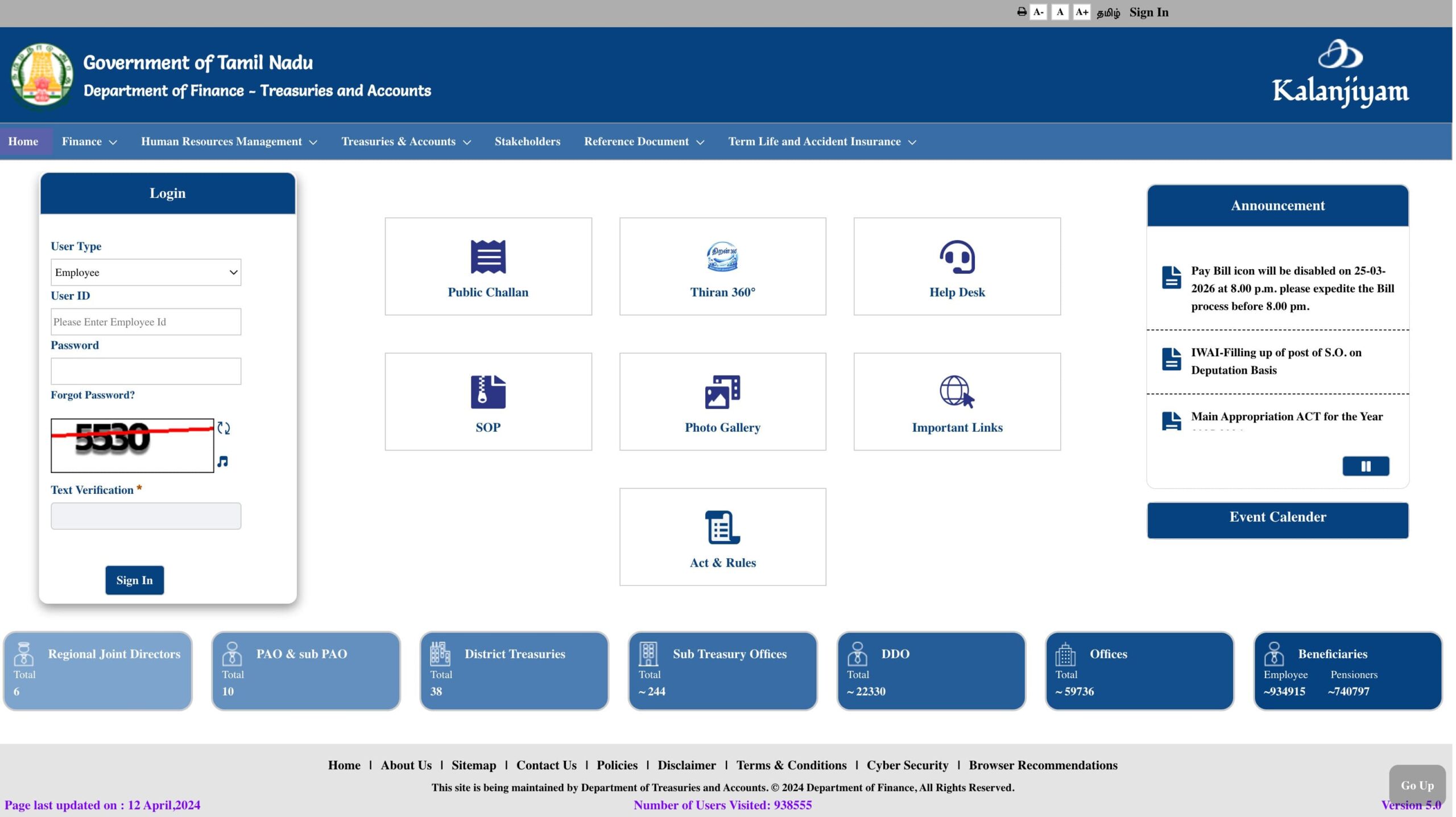
IFHRMS Tamil Nadu (Karuvoolam) Portal Overview
Who Can Use IFHRMS Tamil Nadu?
- Active Employees: Tamil Nadu state government employees of departments integrated with IFHRMS. Contact your DDO to verify if your department is onboarded.
- Pensioners: Retired TN govt employees receiving state pension. Use PPO Number as login.
- DDOs / Accounts Officers: Backend access for payroll processing and bill management.
How to Login to IFHRMS Tamil Nadu
For Employees:
- Go to https://www.karuvoolam.tn.gov.in/
- Locate the Login section on the homepage
- From the User Type dropdown, select “Employee” — selecting the wrong type causes login failure
- Enter your User ID (TCODE)
- Enter your Password (case-sensitive)
- Enter the CAPTCHA code
- Click “Sign In” — redirected to your personalized IFHRMS dashboard
For Pensioners:
- Go to www.karuvoolam.tn.gov.in
- Select User Type as “Pensioner”
- Enter your Pensioner ID or PPO Number as User ID
- Enter your Password and CAPTCHA
- Click Sign In to access the Pensioner Services dashboard
How to Reset Your Password
- Go to karuvoolam.tn.gov.in → Click “Forgot Password” below the login fields
- Select your User Type (Employee or Pensioner)
- Enter your User ID
- Click “Update password using OTP”
- Enter the OTP sent to your registered mobile
- Click Verify
- Enter and confirm new password → Click Update
How to Download Salary Slip from IFHRMS
Method 1 — via All Reports (most commonly used):
- Login to karuvoolam.tn.gov.in
- Click “All Reports” from the sidebar
- Select “Payslip” from the list
- Choose the Month and Year
- Click the link in the “Type” column to open the payslip
- Click Download — saved as password-protected PDF
Method 2 — via Finance → Payroll:
- Login and click the “Finance” module
- Select “Payroll” → “Results”
- Enter the period and pay bill group details
- Download the PDF payslip
How to Download Pension Slip
- Login with pensioner credentials (PPO Number as User ID)
- Go to “Pensioner Services” tab
- Click “Pension Slip” or “Pension Statement”
- Select Financial Year and Month
- Click the Type column link → Download PDF
All Services on IFHRMS Karuvoolam
What Your IFHRMS Salary Slip Contains
IFHRMS Kalanjiyam — Official Mobile App
App Name: IFHRMS Kalanjiyam
Platform: Android (Google Play Store). iOS app under development — iPhone users access via mobile browser.
Features: All portal functions — salary slip, pension slip, leave, GPF, service history, Form 16, government orders.
Download: Search “IFHRMS Kalanjiyam” or “Karuvoolam” on Google Play Store.
Common Problems and Solutions
Q: What is the official IFHRMS portal URL?
The only official portal is https://www.karuvoolam.tn.gov.in/. The direct login page is at karuvoolam.tn.gov.in/web/tnta/oamlogin.
Q: Can I use my IFHRMS payslip for a bank loan?
Yes. The digitally generated payslip from karuvoolam.tn.gov.in is an official document accepted by most banks as valid proof of income for home loans, personal loans, and vehicle loans.
Q: Who is eligible to use IFHRMS Tamil Nadu?
Tamil Nadu state government employees of integrated departments, and retired TN employees receiving state pension. Contractual employees are generally not included.
Q: How do I get my TCODE (User ID)?
TCODE is issued by your department. Contact your DDO or administrative office to obtain your TCODE if you do not have it.
Q: What is Wipro’s role in IFHRMS?
Wipro Ltd is the System Integrator for IFHRMS Tamil Nadu — responsible for implementing and maintaining the technical platform on behalf of the Department of Treasuries and Accounts.
Q: Can I access old salary slips from previous years?
Yes. Login to karuvoolam.tn.gov.in → All Reports → Payslip → select any past month and year to download older salary slips.v