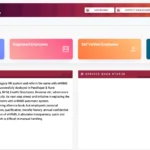
Maharashtra — India’s second most populous state and its economic powerhouse — has one of the largest state government workforces in the country, with lakhs of employees across education, health, revenue, police, public works, and dozens of other departments, plus a massive pensioner base. Managing payroll, pension, GPF, and HR data for this enormous workforce is the job of Sevaarth Mahakosh — the official HRMS and payroll portal of the Government of Maharashtra at sevaarth.mahakosh.gov.in.
What Is Sevaarth Mahakosh?
Sevaarth Mahakosh is the official integrated financial and HR management portal of the Government of Maharashtra — managed by the Finance Department — providing salary slips, pension management, GPF, NPS/DCPS, and all payroll services for Maharashtra state government employees and pensioners.
Sevaarth Mahakosh is the official online salary and HR management portal at sevaarth.mahakosh.gov.in (login page: sevaarth.mahakosh.gov.in/login.jsp), maintained by the Finance Department, Government of Maharashtra. It is also used by Chandigarh government employees on the same platform. The portal is designed to eliminate the need for employees to visit HR or accounts offices for payslips, pension slips, or financial documents — putting all these services online through a single secure login.
| Feature | Details |
|---|---|
| Portal URL | sevaarth.mahakosh.gov.in |
| Direct Login URL | sevaarth.mahakosh.gov.in/login.jsp |
| Managed By | Finance Department, Government of Maharashtra |
| Also Used By | Government of Chandigarh |
| Login Types | Employee / Pensioner / Department |
| Default Password | ifms123 (for all new employees — must be changed after first login) |
| Pensioner Default Login | Username: PENSIONER | Password: ifms123 |
| Modules | Vetanwahini, Niwruttivetanwahini, DCPS/NPS, Koshwahini, GPF (Group D) |
| Availability | 24/7 |
How to Login to Sevaarth Mahakosh
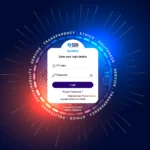
Sevaarth Mahakosh login uses a three-step process — User Type selection, credentials entry, and Captcha — with three distinct login types for Employee, Pensioner, and Department users.
- Open Chrome and navigate to sevaarth.mahakosh.gov.in or directly to sevaarth.mahakosh.gov.in/login.jsp
- On the homepage, click the “Login” button in the top right corner
- Select the appropriate user type from the three options:
- Employee Login — for active Maharashtra government employees
- Pensioner Login — for retired government pensioners
- Department Login — for DDOs and department administrators
- Enter your User ID and Password
- Type the Captcha code shown on screen correctly
- Click Login / Submit
- Your Mahakosh Sevaarth dashboard opens — with access to payslips, employee services, pension reports, and financial modules
First-Time Login — Default Password: For all new employees accessing Sevaarth Mahakosh for the first time, the default password is ifms123 — this is common for every new employee. Upon first login, you will be prompted (and strongly advised) to change this immediately to a secure personal password. Never share your ifms123 default password with anyone.
How to Reset Sevaarth Mahakosh Password
The Sevaarth Mahakosh password reset uses a three-step verification — User Type, User ID, Security Questions, and OTP to registered mobile — available directly from the login page without contacting IT support.
- Go to sevaarth.mahakosh.gov.in
- Click Login → click the “Forgot Password” option
- Select your User Type — Employee / Pension / Department
- Enter your User ID and click Submit
- Answer the Security Questions correctly
- An OTP is sent to your registered mobile number — enter it in the designated field
- Set your new password
For DDO-assisted password reset: If you need an Employee password reset through the DDO (for cases where security questions cannot be answered), the DDO can reset via: Login → Work → Payroll → Reset Employee Password → enter username and mandatory details → Verify and Reset. The portal will confirm “Password has been successfully updated.”
How to Download Salary Slip from Sevaarth Mahakosh
Maharashtra government employees download salary slips through the Employee Services section of Sevaarth Mahakosh — available for any financial year and month in PDF format for loans, tax filing, and personal records.
- Login to sevaarth.mahakosh.gov.in/login.jsp as Employee
- After login, click on the “Employee Services” tab from the top menu
- Select “Pay Slip” or “View Pay Slip” from the dropdown
- Select the Financial Year and Month for which you need the payslip
- Click “Download” to save as PDF
Alternative path: Login → Employee Corner Report → View Payslip → select Month and Year → click Generate → Download/Print.
Pensioner Login — Sevaarth Mahakosh
Retired Maharashtra government pensioners access the Sevaarth portal with a specific username and default password — navigating to Pension Report and entering their PPO number to view and download pension slips.
- Go to sevaarth.mahakosh.gov.in/login.jsp
- Select Pensioner as User Type
- Enter Username: PENSIONER (exact, in capitals)
- Enter Password: ifms123 (default — change after first login)
- Enter Captcha and click Login
- After login, click on Pension Report
- Enter your PPO Number (Pension Payment Order number)
- View or download your pension slip for the selected period
All Modules on Sevaarth Mahakosh
Sevaarth Mahakosh is much more than a salary slip portal — it manages the complete financial lifecycle of Maharashtra government employees and pensioners through five integrated modules.
| Module | Name | Function |
|---|---|---|
| Vetanwahini | Payroll Module | Monthly salary processing, pay bill generation, salary slip downloads |
| Niwruttivetanwahini | Pension Module | Pension processing for retired state government pensioners |
| DCPS / NPS | Defined Contribution Pension | DCPS and National Pension System management for employees joined after 2005 |
| Koshwahini | Pension Self-Service | Pension account access and management for pensioners |
| GPF (Group D) | GPF Management | GPF account management for Group D (Class IV) Maharashtra employees |
Additional services available on Sevaarth Mahakosh include: utility bill payments (electricity, water, telephone bills), income tax statement generation (Form 16), festival advance and other loan applications, and GPF advance requests — making it a complete financial portal for Maharashtra government employees.
Common Problems and Solutions
| Problem | Cause | Solution |
|---|---|---|
| Default password ifms123 not working | Account not activated or already changed | Contact your DDO to confirm account status; if already changed, use Forgot Password |
| Salary slip not loading after login | Wrong financial year selected | Ensure correct financial year and month are selected; try a different month to confirm data exists |
| Account locked (temporary employee becoming permanent) | Old temporary ID deactivated | Visit the nearest Head Office or DDO to get a new permanent Sevaarth ID created |
| Pensioner PPO number not accepted | Wrong PPO number format | Verify PPO number from pension payment order document; contact district treasury if unclear |
| Security questions forgotten for password reset | Questions set long ago and forgotten | Contact your DDO for DDO-assisted password reset through the portal’s admin function |
Frequently Asked Questions — HRMS Maharashtra
❓ What is Sevaarth Mahakosh and who manages it?
Sevaarth Mahakosh is the official payroll and HR portal at sevaarth.mahakosh.gov.in managed by the Finance Department, Government of Maharashtra. It is also used by Chandigarh government employees on the same platform.
❓ What is the default password for Sevaarth Mahakosh?
The default password for all new employees is ifms123. For pensioner login, use Username: PENSIONER and Password: ifms123. Change the default password immediately after first login for security.
❓ How do I download my salary slip from Sevaarth Mahakosh?
Login → Employee Services → Pay Slip → Select Financial Year and Month → Download PDF. Alternatively: Login → Employee Corner Report → View Payslip → Select Month/Year → Generate → Download/Print.
❓ What is Vetanwahini on Sevaarth Mahakosh?
Vetanwahini is the payroll module of Sevaarth Mahakosh — it handles monthly salary processing, pay bill generation, and salary slip downloads for Maharashtra government employees. Similarly, Niwruttivetanwahini is the pension module for retired employees.
❓ What is Koshwahini on Sevaarth Mahakosh?
Koshwahini is the pension self-service module on Sevaarth Mahakosh for pensioners. It provides digital access to pension account details, pension slips, and pension-related management — accessible after pensioner login with USERNAME: PENSIONER and Password: ifms123.
❓ Can I pay utility bills on Sevaarth Mahakosh?
Yes. Maharashtra government employees can pay utility bills — electricity, water, telephone — directly through the Sevaarth Mahakosh portal. This is an additional convenience feature beyond payroll and salary management.
⚠️ Disclaimer: This article is for informational purposes only. HRMSPedia is not affiliated with the Finance Department, Government of Maharashtra. Visit sevaarth.mahakosh.gov.in for official access. April 2026.