HimKosh is the official Integrated Financial Management Information System (IFMIS) of Himachal Pradesh. Developed by NIC (National Informatics Centre), Shimla, it is managed by the Department of Treasuries, Accounts and Lotteries under the Finance Department of the Government of Himachal Pradesh.
Through HimKosh, Himachal Pradesh government employees can access their eSalary slips, GPF statements, pension details, CPS/PRAN information, and eChallan services — all online without visiting treasury offices.
How to View & Download Salary Slip (eSalary) on HimKosh
💰 How HP Salary Slips Work
Unlike some other state portals, the HimKosh eSalary system does NOT require a separate password for employees to view salary slips. You access it using just your Employee Code, Employee Name, and Treasury selection.
- Go to himkosh.nic.in.
- On the homepage, look for “Citizen Services” in the menu.
- Click on “Salary Statement” or “eSalary.”
- A new page opens. Enter your Employee Code (format: like IP 99999) and Employee Name.
- Select your Treasury from the dropdown — this is your district treasury.
- Click Login.
- In the Salary Slip section, enter the Month and Year (MM YYYY format).
- Click “Show” to view your salary slip.
- Download or print from the screen.
How to View GPF Statement on HimKosh
- Go to the HimKosh portal — himkosh.hp.nic.in/aghp/.
- Select your Serial Code (GPF series code) from the dropdown.
- Enter your GPF Account Number.
- Enter your Employee PIN (4-digit PIN set by you).
- Click Submit.
- Your GPF statement is displayed. Download it as PDF.
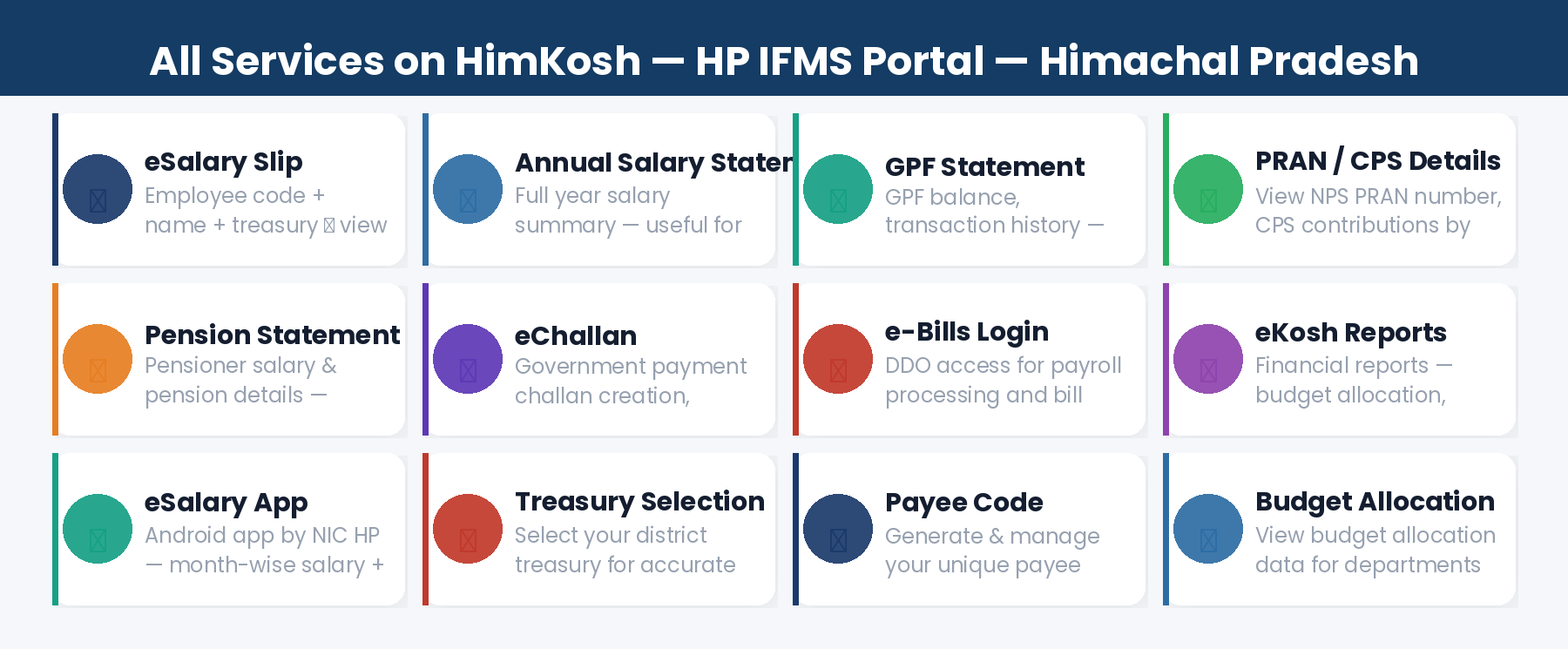
All Services on HimKosh Portal
1. eSalary Slip
Download month-wise salary slips for any past month. Includes Basic Pay, Gross Amount, HRA, LTA, Bonus, and Deductions (GPF, Profession Tax, GIS, GLI, Recoveries). Valid for loans, visa, and income tax filing.
2. Annual Salary Statement
Full year salary summary for income tax filing. Access from the same eSalary section by selecting the full financial year.
3. GPF Statement
Complete GPF account statement showing contributions, withdrawals, interest credits, and current balance. Access at himkosh.hp.nic.in/aghp/ using your GPF series code and account number.
4. NPS / PRAN / CPS Details
For post-2004 employees covered under NPS or CPS, view your PRAN number and contribution details. Go to HimKosh → Financial Year selection → Enter Employee Code or PRAN → View NPS Details. Use “Know Your PRAN” option if PRAN is not known.
5. Pension Statement
Pensioners can view and download pension statements through the HimKosh portal using their pension account details.
6. eChallan
Create and make government payment challans online through HimKosh. Select department, district, and treasury, enter DDO and payment details, and generate the challan receipt.
7. e-Bills Login (DDO Access)
DDOs (Drawing and Disbursing Officers) login to the e-Bills section to process payroll, make monthly changes to employee salaries, and submit bills electronically through the treasury portal.
8. eKosh Financial Reports
View budget allocation, budget expenditure, and financial reports for HP government departments through the eKosh section of HimKosh.
9. Payee Code
Employees and departments can generate or view their Payee Code through HimKosh at himkosh.hp.nic.in/aghp/. Payee Code is the unique identifier for salary payment and GPF tracking in the HP government system.
eSalary App — HimKosh Mobile App
📱 eSalary App for HP Employees
App Name: eSalary (by NIC HP) | Platform: Android (Google Play Store)
Features: Month-wise salary details, GPF/PRAN account balance — for HP govt employees. Non-treasury organisations onboarded on eSalary can also use the app.
Download: Search “eSalary NIC HP” on Google Play Store.
Frequently Asked Questions
Q: What is the difference between himkosh.nic.in and himkosh.hp.nic.in?
Both URLs work for HimKosh — himkosh.nic.in and himkosh.hp.nic.in both lead to the same Himachal Pradesh IFMS portal. You can use either.
Q: What is an Employee Code in HimKosh and how do I find it?
Employee Code is a unique number issued to each HP government employee (format like IP 99999). It is printed on your salary slip. Contact your DDO if you do not know it.
Q: How do I view my NPS/PRAN details on HimKosh?
Go to HimKosh → Select Financial Year → Enter Employee Code or PRAN number → Click “View NPS Details.” If you do not know your PRAN, use the “Know Your PRAN” option.
Q: Can I download old salary slips from HimKosh?
Yes. You can select any past month and year to download older salary slips from HimKosh, subject to the data available in the system.
Q: How do I change my GPF PIN on HimKosh?
The GPF PIN is the 4-digit number you set when you first accessed your GPF account. If you have forgotten it, contact your nearest Treasury Office or the Directorate of Treasuries in Shimla.