Punjab National Bank — one of India’s oldest and largest public sector banks — operates the PNB HRMS Parivar 2.0 system, a mature digital HR platform that has served PNB employees since 2006 and has been continuously upgraded. With mandatory two-factor authentication (OTP) and device-bound biometric login introduced in 2026, PNB Parivar 2.0 is now among the most secure bank HRMS systems in the country.
What Is PNB HRMS Parivar 2.0?
PNB HRMS Parivar 2.0 is the official HR management system of Punjab National Bank — first implemented in 2006 for centralised payroll and salary processing — now covering payslip download, leave management, performance appraisal, pension services, and employee welfare through a web portal and the PNB Parivar 2.0 mobile app.
| Feature | Details |
|---|---|
| Portal URL | hrms.pnb.bank.in |
| User ID | PF Number (Employee Provident Fund Number) |
| Password | HRMS / Parivar Password (case-sensitive) |
| Security (2026) | Mandatory OTP 2FA + Device Binding |
| Mobile App | PNB Parivar 2.0 — Android + iOS — Biometric + Face ID |
| Implemented Since | 2006 (originally as PNB Parivar for payroll processing) |
| HQ / HR Division | HRMD Division, Plot No. 4, Sector 10, Dwarka, New Delhi |
| Post-Merger Banks Covered | Original PNB + Oriental Bank of Commerce + United Bank of India |
How to Login to PNB HRMS Parivar 2.0
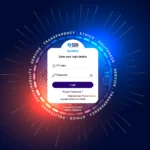
PNB HRMS login requires the PF Number as User ID with mandatory OTP two-factor authentication introduced in 2026 — applicable to both web portal and the Parivar mobile app.
- Open Chrome and navigate to hrms.pnb.bank.in
- Enter your PF Number as User ID
- Enter your HRMS/Parivar Password (case-sensitive)
- Enter the Captcha text shown on screen
- Complete 2FA by entering the OTP sent to your registered mobile number
- Click Login
Important: The PNB HRMS portal is accessible only within the PNB internal network. You cannot open it from a personal device on the internet. For home access, use the PNB Parivar 2.0 mobile app which provides authorized remote access.
How to Download Salary Slip from PNB HRMS
PNB employees download monthly salary slips and annual income/tax projections directly from the HRMS portal — covering all pay components and deductions in a downloadable PDF.
- Login to PNB HRMS from the bank’s internal network
- Navigate to Payroll → Salary Slip
- Select Month and Year
- Click View / Download to generate PDF
- For Form 16: navigate to Tax section → Form 16 → select Financial Year
PNB Parivar 2.0 Mobile App — 2026 Features
PNB Parivar 2.0 is the official mobile companion for PNB HRMS — with biometric login (fingerprint/Face ID), device binding, e-Circulars, and the SAATHI employee welfare module added in 2026.
- Biometric Login — Fingerprint or Face ID on compatible devices
- Device Binding — App registered to one device only for security
- e-Circulars — Browse official bank circulars and notices
- SAATHI Module — Employee benefit handbook and welfare scheme access
- Payslip Download — Access salary slips on mobile
- Leave Balance — Check leave balance and submit leave applications
Download PNB Parivar 2.0 from Google Play Store or Apple App Store. Search “PNB Parivar” — verify it is the official PNB app before downloading.
All PNB HRMS Features
PNB HRMS Parivar 2.0 covers the complete HR lifecycle for PNB staff — from personal profile management and payroll to performance appraisal, pension tracking, and the digital allowance claims workflow.
- Employee Profile — View and update personal details, contact info, dependent data
- Payroll & Salary — Monthly payslips + annual income/tax projections + Form 16
- Leave Management — Apply for Casual Leave (CL), Privilege Leave (PL), Sick Leave with real-time status tracking
- Attendance Tracking — View attendance records
- Performance Appraisal (PAF) — Access and submit Performance Appraisal Forms, view feedback and promotion info
- Allowance Claims — Submit digital claims for newspaper, petrol, cleansing materials, briefcase allowances — fully paperless
- Staff Loans — Track staff loan applications, EMI schedules, and balance
- Pension Services — View pension slips and life certificate submission status for retirees
- PNB UNIV Training — Training modules linked to HRMS for RBI-mandated and internal courses
Frequently Asked Questions
❓ What is PNB Parivar?
PNB Parivar (now PNB Parivar 2.0) is the HR management system of Punjab National Bank, first launched in 2006. The web portal is at hrms.pnb.bank.in and the mobile app is PNB Parivar 2.0.
❓ What is the User ID for PNB HRMS login?
Your PF Number (Employee Provident Fund Number) is the User ID for PNB HRMS Parivar 2.0 login.
❓ Can I access PNB HRMS from home?
The web portal (hrms.pnb.bank.in) is accessible only on the PNB internal network. For home access, use the PNB Parivar 2.0 mobile app which provides authorised remote access.
❓ What is the SAATHI module on PNB HRMS?
SAATHI is a PNB Parivar 2.0 app module providing access to employee benefit handbooks and welfare scheme details for PNB staff and their families.
⚠️ Disclaimer: HRMSPedia is not affiliated with Punjab National Bank. Visit hrms.pnb.bank.in for official access. April 2026.