West Bengal has one of the largest state government workforces in India — teachers, police officers, health workers, administrative staff, and thousands of others serving across 23 districts and Kolkata. Managing salary, provident fund, leave, pension, and service records for this vast workforce requires a sophisticated, centralized digital platform. That platform is WBIFMS — the West Bengal Integrated Financial Management System. This complete guide covers everything every West Bengal government employee needs to know about the portal in 2026.
What Is WBIFMS?
WBIFMS is the official digital financial and HR management platform of the Government of West Bengal — launched in April 2014 by the Finance Department to centralize salary, payroll, GPF, leave, pension, and budgeting for all state government employees.
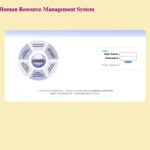
WBIFMS stands for West Bengal Integrated Financial Management System. It is the flagship digital governance initiative of the Finance Department, Government of West Bengal. Originally launched in April 2014, it has grown into a comprehensive system covering employee HR services, treasury management, DDO bill processing, budget allocation, and pension management — all under one integrated platform at wbifms.gov.in.
The most significant recent development is the launch of WBIFMS 3.0 from 1 April 2026 — an upgraded version with improved modules, faster processing, better inter-departmental integration, enhanced NGIPF (New Generation Integrated Provident Fund) features, and strengthened security with OTP-based login verification.
About WBIFMS – West Bengal Government Employee
This table gives every West Bengal government employee all critical portal details — URLs, login types, mobile app, and key system facts — in one convenient reference.
|
Feature |
Details |
|
Portal Full Name |
West Bengal Integrated Financial Management System |
|
Official URL |
wbifms.gov.in |
|
HRMS ESS Login |
wbifms.gov.in/hrms-ess |
|
Managed By |
Finance Department, Government of West Bengal |
|
Launched |
April 2014 |
|
Latest Version |
WBIFMS 3.0 (from 1 April 2026) |
|
Employee Login Type |
e-Services for Employees (eSE) — for personal services |
|
DDO Login |
For bill preparation, treasury submission, and departmental functions |
|
Mobile App |
“WBIFMS” — available on Google Play Store |
|
GRIPS Challan |
Integrated challan payment system for citizens and departments |
|
Pension Access |
Available — retired employees access pension slips and details |
|
Portal Availability |
24/7 |
WBIFMS 3.0 — What’s New in 2026
WBIFMS 3.0 launched on 1 April 2026 brings significant improvements to payroll processing, login security, mobile accessibility, and provident fund management for all West Bengal government employees.
The Finance Department of West Bengal rolled out WBIFMS 3.0 from 1 April 2026 with a phased implementation approach. Key upgrades include faster login and dashboard load times, improved salary slip generation with more reliable PDF downloads, enhanced NGIPF module with employee-wise PF balance tracking, interest credit, PF advances, and settlement processing. OTP-based login verification has been strengthened significantly, improving data protection across the platform. Mobile accessibility has been optimized, making the portal smoother on smartphones. The platform continues to strengthen digital budgeting, e-billing, and pension management with real-time fund tracking.
Two Login Systems on WBIFMS — Understanding the Difference
WBIFMS operates two distinct login systems serving different user types — individual employees use the eSE login while DDOs and treasury officials use the main iFMS login for bill-related work.
This is the most important thing to understand before attempting to login to WBIFMS:
|
Login Type |
URL |
Who Uses It |
What It’s For |
|
eSE (e-Services for Employees) |
wbifms.gov.in/hrms-ess |
Individual employees |
Salary slips, GPF, leave, loans, service book, IT statement |
|
iFMS / DDO Login |
wbifms.gov.in |
DDOs, department officers, treasury officials |
Bill processing, budget management, salary bill submission |
Individual employees must use the eSE (e-Services for Employees) login — not the main iFMS login. The eSE portal is at wbifms.gov.in/hrms-ess. Using the wrong login system is the single most common source of confusion among West Bengal government employees.
How to Register on WBIFMS (New Employees)
New employees must complete a one-time registration using their Employee ID, Mobile Number, Date of Birth, and PAN before they can access the eSE portal for salary slips and HR services.
- Open Google Chrome and go to wbifms.gov.in
- On the homepage, click “Sign Up for Registration” or navigate to the eSE section
- Enter your Employee ID — this is your HRMS ID assigned when you joined
- Enter your registered Mobile Number
- Enter your Date of Birth and PAN number as requested
- An OTP is sent to your registered mobile number — enter it to verify
- Set a strong login password — combine uppercase, lowercase, numbers, and symbols
- Your WBIFMS eSE account is now created — login immediately to verify access
Important: If your mobile number is not registered in the HRMS system, contact your DDO (Drawing and Disbursing Officer) to get it updated first. Without a registered mobile number, registration and OTP-based login cannot proceed.
How to Login to WBIFMS (e-Services for Employees)
After registration, the eSE login takes under a minute — employees use their Employee Number and password to reach the personalized dashboard showing salary slips, GPF, leave, and all personal services.
- Open Google Chrome and go to wbifms.gov.in/hrms-ess (eSE login page)
- Enter your Employee Number as the User ID — this is your HRMS Employee ID
- Enter your Password set during registration
- Complete OTP verification if prompted — OTP is sent to your registered mobile
- Click Login
- Your personalized WBIFMS eSE dashboard opens — showing salary slip links, GPF balance, leave status, and all personal financial services
Note from the official portal: The portal itself states — “Please go to e-Services for Employees (eSE) login for individual/personal matters like: Viewing Pay slip/IT statement/Loan/Leave/TA/DA/LTC sanction orders, Applying for Loan/Leave/TA/DA/LTC, Writing SAR as ‘Officer Reported upon’ (self), Writing comments as Reporting/Reviewing officer.”
How to Reset Your WBIFMS Password
Password reset on WBIFMS uses OTP verification on your registered mobile number — the process is available directly on the login page and typically takes under three minutes.
- Go to wbifms.gov.in/hrms-ess
- Click “Forgot Password” on the login page
- Enter your Employee ID and registered details
- An OTP is sent to your registered mobile number
- Enter the OTP to verify your identity
- Create a new strong password and confirm it
- Login immediately with the new password
If your registered mobile number has changed, contact your DDO to update it in the HRMS system before attempting password recovery.
How to Download Salary Slip from WBIFMS
WBIFMS salary slip download is available for any past month in PDF format — accessible through the My Documents section after eSE login in under three clicks.
- Login to wbifms.gov.in/hrms-ess using your Employee Number and password
- After login, look for the “My Documents” option on the dashboard
- Click on “View Pay Slip”
- On the payslip application, use the back or next arrow to select the year
- Select the Month
- The payslip for that month is displayed on screen
- Click Download or use File → Print from the browser to save as PDF
What the West Bengal salary slip contains: The WBIFMS pay slip includes Employee Code, Name, GPF Number, Designation, Scale, PAN Number, Bank Account Details, Aadhaar Number, Basic Pay, Dearness Allowance (DA), House Rent Allowance (HRA), all applicable allowances, and all deductions including Professional Tax, GPF contributions, GIS, recoveries, and installments paid.
All Services Available on WBIFMS
WBIFMS provides West Bengal government employees a complete digital service portfolio — from monthly salary slips and GPF management to leave applications, loans, pension, and GRIPS challans.
HRMS Employee Module (e-Service Book)
The HRMS module is the heart of WBIFMS for individual employees — maintaining complete service records from joining to retirement in a single digital repository.
The HRMS module maintains complete employee data from joining details, transfers, leave records, promotions, to retirement information. Employees view payslips, update personal details, and apply for leave online without paperwork. The e-Service Book is the digital equivalent of the traditional manual service book — recording every service event with timestamps. It is used for DPC proceedings, pension calculations, and official verifications.
Salary Slip and Financial Records
Every salary-related document — monthly payslips, arrear statements, income tax statements, and annual financial records — is available to employees through the eSE portal at any time.
Monthly salary slips are available in PDF for any past month. Year-wise statements and arrear details are stored digitally. IT (Income Tax) statements — required for ITR filing — are accessible through the portal. Past payslips dating back years are stored in the system, reducing dependency on manual DDO records.
GPF (General Provident Fund) Management
The NGIPF module on WBIFMS 3.0 provides West Bengal government employees with comprehensive GPF management — balance tracking, interest credit, advance applications, and settlement processing.
The WBIFMS NGIPF module underwent significant upgrades in WBIFMS 3.0, adding employee-wise PF balance tracking with real-time updates, interest credit visibility, online application for PF advances, and settlement processing. Pre-2005 employees (who are under the GPF scheme) benefit most from this module. Employees can view their complete GPF account history, submit withdrawal applications, and track processing status.
Leave Management
The eSE portal allows West Bengal government employees to apply for leave online, track real-time approval status, and view leave balance without visiting their establishment section.
Employees apply for all categories of leave — Earned Leave, Casual Leave, Medical Leave, maternity and other special leaves — directly through the eSE portal. Leave applications are submitted digitally and routed to the DDO or reporting officer for online sanction. Employees receive notifications for approval, rejection, or pending status. Leave account balance is visible on the dashboard and updated in real time after approvals.
Loan Applications
Employees apply for government loan products — computer loans, house building advances, vehicle loans, and other service loans — directly through the WBIFMS eSE portal.
All types of service loans available under West Bengal government service rules can be applied for through the portal. Application status is tracked in real time. Loan account details including outstanding balance, installment deductions, and repayment history are visible to the employee.
TA/DA and LTC Claims
Travel Allowance, Daily Allowance, and Leave Travel Concession claims are processed entirely online through WBIFMS — eliminating paper claim forms and manual verification delays.
Employees submit TA/DA claims and LTC applications through the eSE portal. Claims are digitally routed to the appropriate sanctioning authority. Status tracking is available from submission through sanction to payment.
Pension Services
Retired West Bengal government employees access pension-related services through WBIFMS — pension slip download, pension details verification, and grievance submission for pension issues.
Retired state government employees can login to view pension details, download pension slips, and verify pension account information. The portal assists superannuating employees to prepare pension papers online — reducing the burden on both employees and establishment offices. WBIFMS automates pension paper generation from existing service data.
GRIPS — Government Receipt Portal System
GRIPS is the integrated challan payment system within WBIFMS — allowing citizens, departments, and employees to generate, pay, and verify government challans online.
GRIPS (Government Receipt Portal System) is one of the most widely used features of WBIFMS by the general public. Citizens can generate and pay challans for court fees, land revenue, registration fees, and other government dues online. Departments use GRIPS for internal financial transactions. Employees use it for certain HR-related payments. Challan status can be verified online using the GRIPS reference number.
DDO Functions (For Drawing and Disbursing Officers)
DDOs use the main WBIFMS iFMS login — separate from the employee eSE login — for salary bill processing, treasury submission, budget management, and departmental financial functions.
DDOs use the main iFMS portal at wbifms.gov.in to prepare and present salary bills and non-salary bills to treasuries. Budget provisions are distributed and allocated to sub-offices digitally. All departmental financial workflows — from bill creation to treasury sanction — are managed through WBIFMS. Real-time tracking of fund releases, expenditures, and disbursements is available to DDOs.
Departments Connected to WBIFMS
All major departments of the Government of West Bengal are integrated with WBIFMS — enabling seamless data flow, centralized payroll, and real-time financial monitoring across the state administration.
WBIFMS integrates all major West Bengal state government departments including Finance, Education (School and Higher), Health, Home (Police), Agriculture, Panchayat and Rural Development, Public Works, Public Health Engineering, Urban Development, and all district administration offices. This integration enables centralized salary processing, real-time budget monitoring, and unified employee data management across the state.
Common Problems and Solutions
This troubleshooting table covers the most frequently reported WBIFMS login and service issues with practical solutions West Bengal government employees can apply independently.
|
Problem |
Cause |
Solution |
|
Login page shows error |
Using iFMS DDO login instead of eSE login |
Go to wbifms.gov.in/hrms-ess — this is the correct employee login page |
|
OTP not received for login/registration |
Mobile number not registered in HRMS |
Contact your DDO to update your registered mobile number in the system |
|
Salary slip not showing for current month |
Salary bill not yet submitted or sanctioned by DDO |
Wait for DDO to process the bill; contact your establishment section if delayed |
|
Password reset email or SMS not arriving |
Wrong mobile or system issue |
Check registered mobile; contact WBIFMS helpdesk if OTP still not received |
|
GPF balance showing incorrect |
Data not updated after recent transaction |
Transactions update with processing lag; check again in 2-3 working days |
|
Leave application not going through |
DDO not assigned correctly in system |
Contact your establishment section to verify correct DDO mapping |
|
Portal showing “Service Temporarily Unavailable” |
Scheduled maintenance window |
Check the portal notice board; retry after the maintenance window |
|
eSE login works but salary slips are blank |
New employee — payroll not yet processed |
Wait for first payroll cycle to complete after joining formalities |
Frequently Asked Questions — WBIFMS
Answers to the most important and commonly asked questions from West Bengal government employees about the WBIFMS portal, login, salary slips, GPF, and all services.
Q: What is WBIFMS and what does it stand for?
WBIFMS stands for West Bengal Integrated Financial Management System. It is the official digital financial and HR management platform of the Government of West Bengal, launched in April 2014 by the Finance Department. It manages payroll, GPF, leave, pension, budget, and treasury operations for West Bengal state government employees.
Q: What is the official URL for WBIFMS?
The main portal is at wbifms.gov.in. The employee self-service (eSE) login for individual HR and payroll services is at wbifms.gov.in/hrms-ess. The WBIFMS mobile app is available on the Google Play Store by searching “WBIFMS”.
Q: What is WBIFMS 3.0?
WBIFMS 3.0 is the upgraded version of the portal launched by the Finance Department from 1 April 2026. It brings improved modules, faster processing, better inter-departmental integration, enhanced NGIPF provident fund features, OTP-based login security, and optimized mobile accessibility.
Q: How do I download my salary slip from WBIFMS?
Login to wbifms.gov.in/hrms-ess with your Employee Number and password → My Documents → View Pay Slip → Select Year using back/next arrows → Select Month → The payslip appears → Download or Print as PDF.
Q: What details appear on the WBIFMS salary slip?
The West Bengal government salary slip includes Employee Code, Name, GPF Number, Designation, Scale, PAN Number, Bank Account Details, Aadhaar Number, Basic Pay, DA, HRA, all applicable allowances, and all deductions including Professional Tax, GPF, GIS, and installment recoveries.
Q: Can I access WBIFMS on my mobile phone?
Yes. The WBIFMS portal is mobile-accessible through a browser. A dedicated mobile app called “WBIFMS” is available on the Google Play Store for Android devices, providing instant access to salary slips, leave status, and employee data with push notifications.
Q: What is GRIPS in WBIFMS?
GRIPS stands for Government Receipt Portal System — the integrated challan payment system within WBIFMS. Citizens use it to generate and pay government challans online. Challan status can be verified using the GRIPS reference number through the WBIFMS portal.
❓ Can retired employees access WBIFMS? Yes. Retired West Bengal government employees can access pension-related services through the WBIFMS portal — viewing pension details, downloading pension slips, and raising pension-related grievances online.